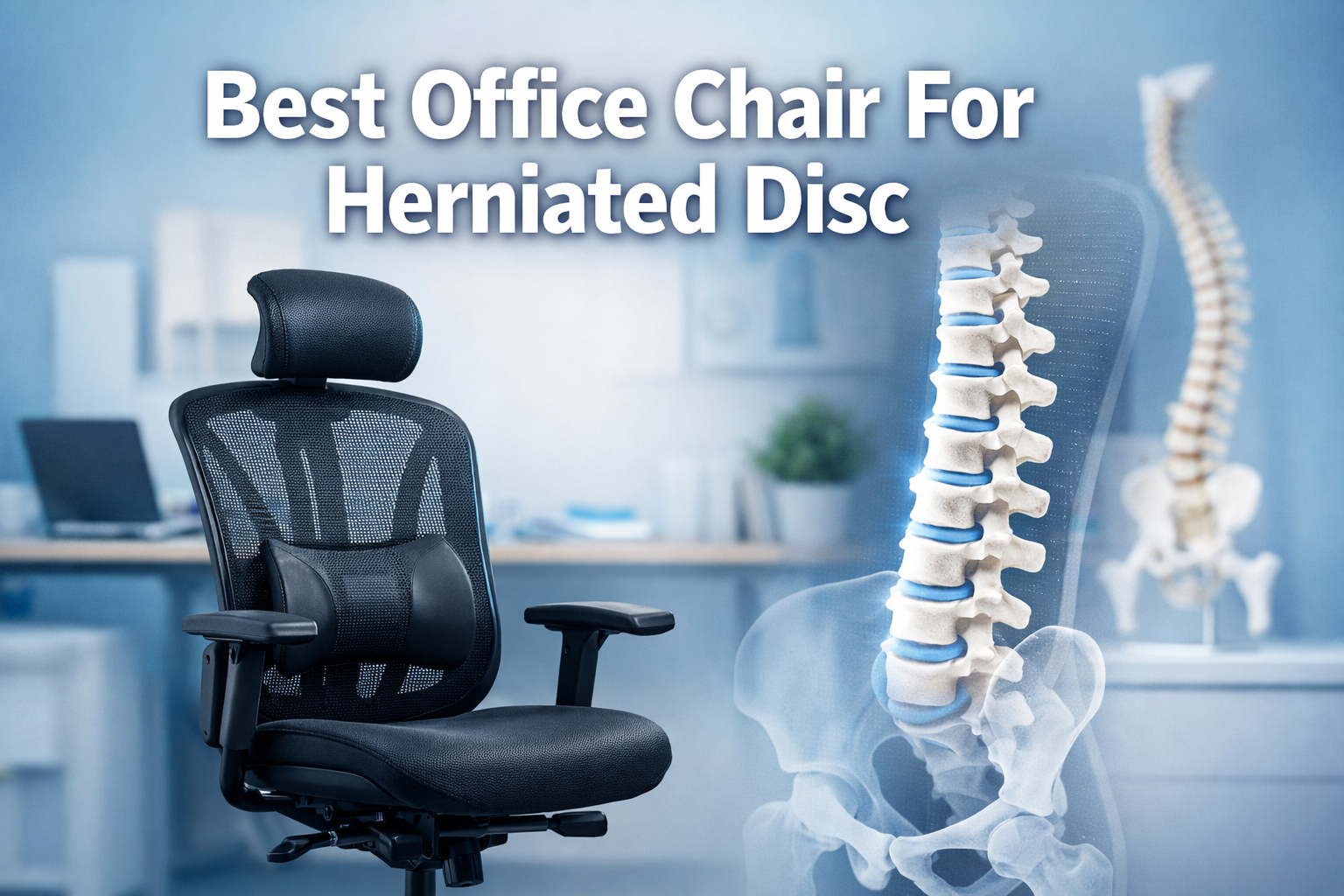
Best Office Chair For Herniated Disc
Sarah’s workday used to end the same way every evening, with shooting pain radiating down her left leg and a lower back that felt like it was on fire. After her doctor diagnosed a herniated disc at L4-L5, she realized her standard office chair wasn’t just uncomfortable; it was actively making her condition worse.
Like millions of professionals dealing with disc herniation, Sarah needed more than just pain medication—she needed the Best Office Chair For Herniated Disc relief that could transform her daily work experience from agonizing to manageable.
Finding the right ergonomic seating solution isn’t just about comfort; it’s about preventing further spinal damage and supporting the body’s natural healing process.
In 2026, the science of ergonomic chair design has evolved dramatically, offering herniated disc sufferers targeted relief through advanced biomechanical engineering.
Key Takeaways
- Dynamic lumbar support with adjustable height and depth is essential to prevent posterior pelvic tilt, the leading cause of disc strain during prolonged sitting
- Elastic mesh technology maintains constant posterior-to-anterior force on L3-L4 vertebrae, preventing harmful C-curve collapse when leaning forward
- Waterfall seat edges prevent circulation cutoff and reduce sciatica symptoms by eliminating pressure on the backs of thighs
- Research published in Spine journal demonstrates that chairs with enhanced lumbar support significantly reduce intradiscal pressure and muscle fatigue[1]
- The best office chair for herniated disc combines multiple ergonomic features rather than relying on a single adjustment mechanism
Understanding Herniated Discs and Why Your Chair Matters
What Is a Herniated Disc?
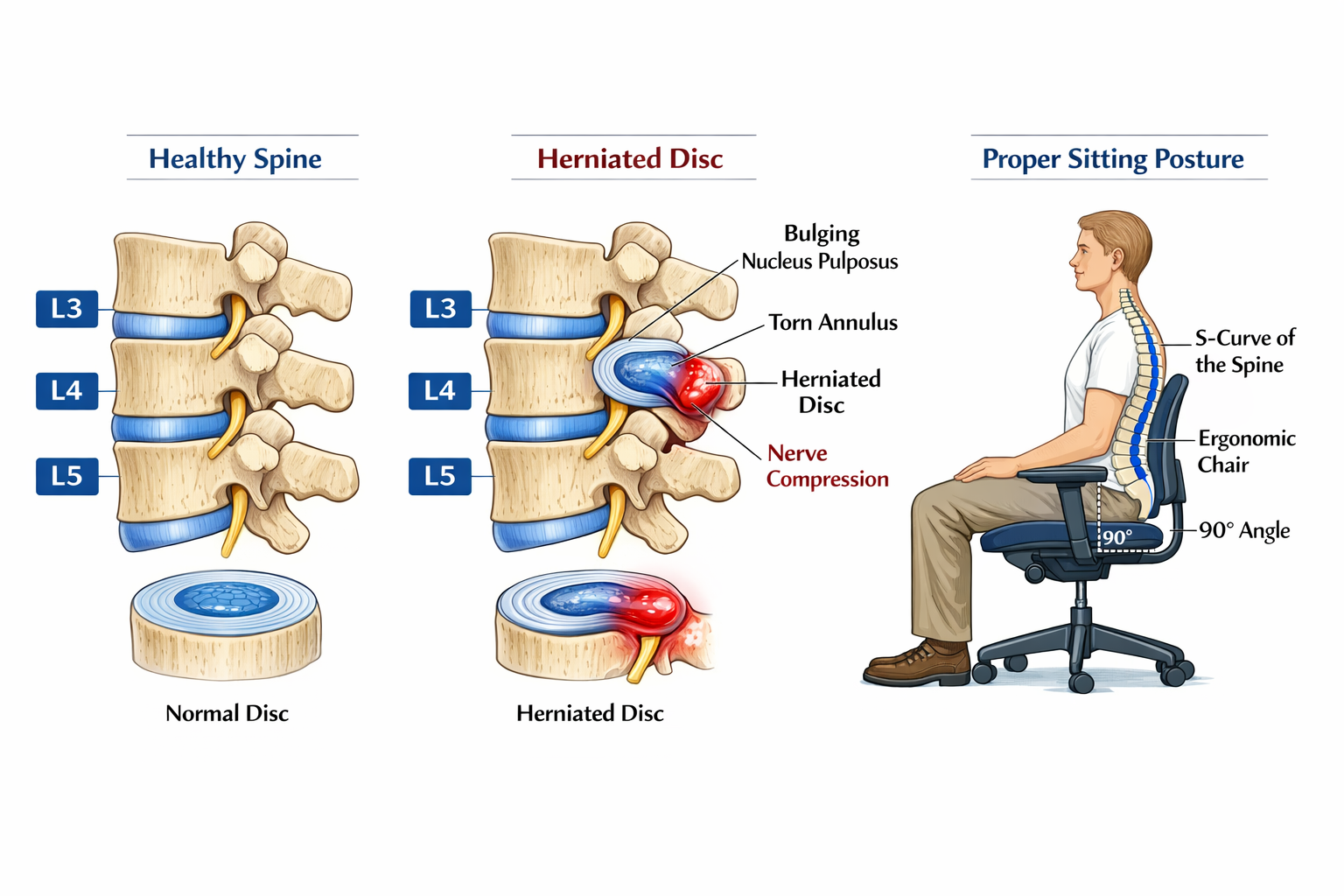
A herniated disc occurs when the soft, gel-like center (nucleus pulposus) of a spinal disc pushes through a tear in the tougher exterior ring (annulus fibrosus). This bulging material can compress nearby nerves, causing pain, numbness, tingling, and weakness that radiates into the legs, a condition commonly known as sciatica.
The lumbar spine, particularly the L4-L5 and L5-S1 discs, bears the greatest load during sitting. Poor seated posture increases intradiscal pressure by up to 40% compared to standing, making chair selection a critical factor in pain management and recovery.
The Sitting Problem: Why Standard Chairs Fail
Most conventional office chairs lack the sophisticated support systems needed to maintain proper spinal alignment. When sitting in a standard chair, the natural tendency is to slouch, which causes:
- Posterior pelvic tilt that flattens the lumbar curve
- Increased disc compression in the lower spine
- Uneven pressure distribution across vertebral structures
- Muscle fatigue from compensatory stabilization efforts
- Reduced circulation to lower extremities
For someone with a herniated disc, these biomechanical failures transform an eight-hour workday into an endurance test of pain management. The solution lies in understanding how the best office chair for herniated disc relief addresses these specific challenges.
Essential Features of the Best Office Chair For Herniated Disc Relief
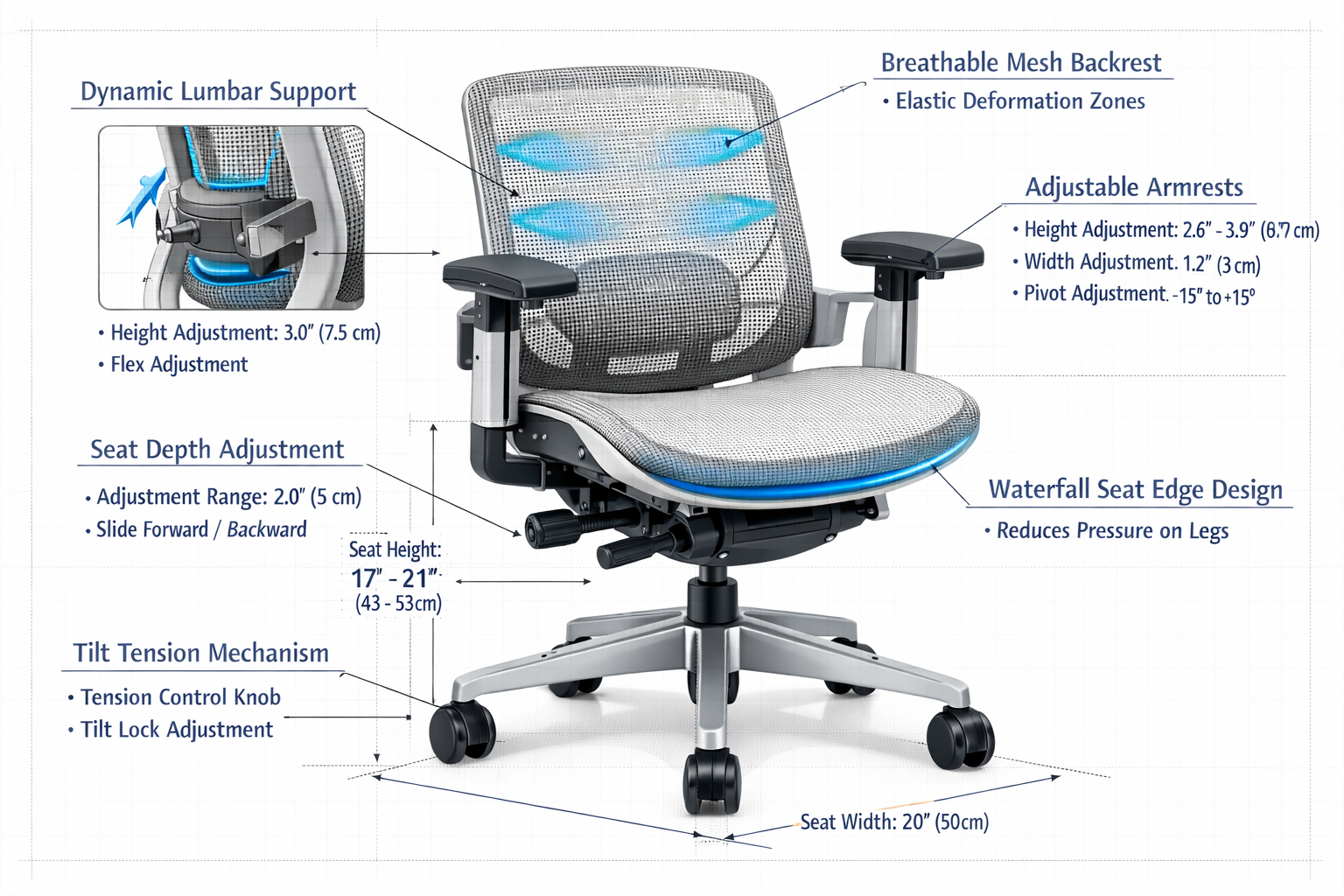
Dynamic Lumbar Support: The Foundation of Spinal Health
Not all lumbar support is created equal. The most critical feature in any ergonomic office chair for disc herniation is dynamic, adjustable lumbar support that can be customized in both height and depth[1].
Why adjustability matters:
✅ Height adjustment ensures the support contacts the L3-L4 vertebrae precisely, where most herniated discs occur
✅ Depth adjustment provides the right amount of posterior-to-anterior force without creating uncomfortable pressure
✅ Dynamic flexibility allows the support to move with your body rather than creating rigid resistance
Studies published in the journal Spine demonstrate that chairs with enhanced lumbar support can significantly reduce intradiscal pressure and muscle fatigue during prolonged sitting sessions[1].
This isn’t just about comfort, it’s about measurable reduction in the forces that aggravate disc herniation.
Elastic Mesh Technology: The 2026 Innovation
Advanced chairs now utilize elastic deformation rather than rigid lumbar pads. This breakthrough technology uses elastic mesh that maintains constant posterior-to-anterior force on the L3-L4 vertebrae regardless of torso angle[4].
The biomechanical advantage:
Traditional rigid lumbar supports lose effectiveness when you lean forward to type or reach for items on your desk. The lumbar curve collapses into a harmful C-shape, increasing disc pressure. Elastic mesh technology prevents this full C-curve collapse by providing continuous, responsive support that adapts to movement[4].
Think of it like the difference between a rigid board and a supportive hand, the mesh moves with you while maintaining essential support.
Waterfall Seat Edge: Relief for Sciatica Sufferers
A waterfall seat edge—curving downward at the front—is essential for patients experiencing sciatica symptoms from herniated discs[1].
This design feature:
- Eliminates pressure on the backs of thighs
- Prevents circulation cutoff to lower legs
- Reduces nerve compression that exacerbates radiating pain
- Allows for proper leg positioning without edge pressure
For someone like Sarah, whose herniated disc caused severe sciatica, this single feature transformed her ability to sit for extended periods without numbness and tingling in her legs.
Seat Depth Adjustment: Accommodating Different Body Types
Customization options for different body types represent a significant content gap that most competitors miss. The ideal seat depth allows you to:
- Sit with your back fully against the lumbar support
- Maintain 2-3 inches of space between the seat edge and the back of your knees
- Keep feet flat on the floor with knees at 90-degree angles
Users with shorter legs need shallower seat depth, while taller individuals require deeper seats. The Best Office Chair For Herniated Disc, includes pneumatic or manual seat depth adjustment to accommodate users from 5’0″ to 6’5″.
Adjustable Armrests: Reducing Upper Body Compensation
When lower back pain strikes, the natural tendency is to compensate by tensing shoulder and neck muscles. Ergonomic sitting solutions include 4D adjustable armrests that move:
- Up and down (height adjustment)
- Forward and backward (depth adjustment)
- Side to side (width adjustment)
- Inward and outward (angle adjustment)
Proper armrest positioning reduces shoulder elevation and allows the arms to rest at natural angles, preventing the upper body tension that compounds lower back pain.
Top-Rated Chairs: The Best Office Chair For Herniated Disc in 2026
Steelcase Gesture: Best for Natural Spine Alignment
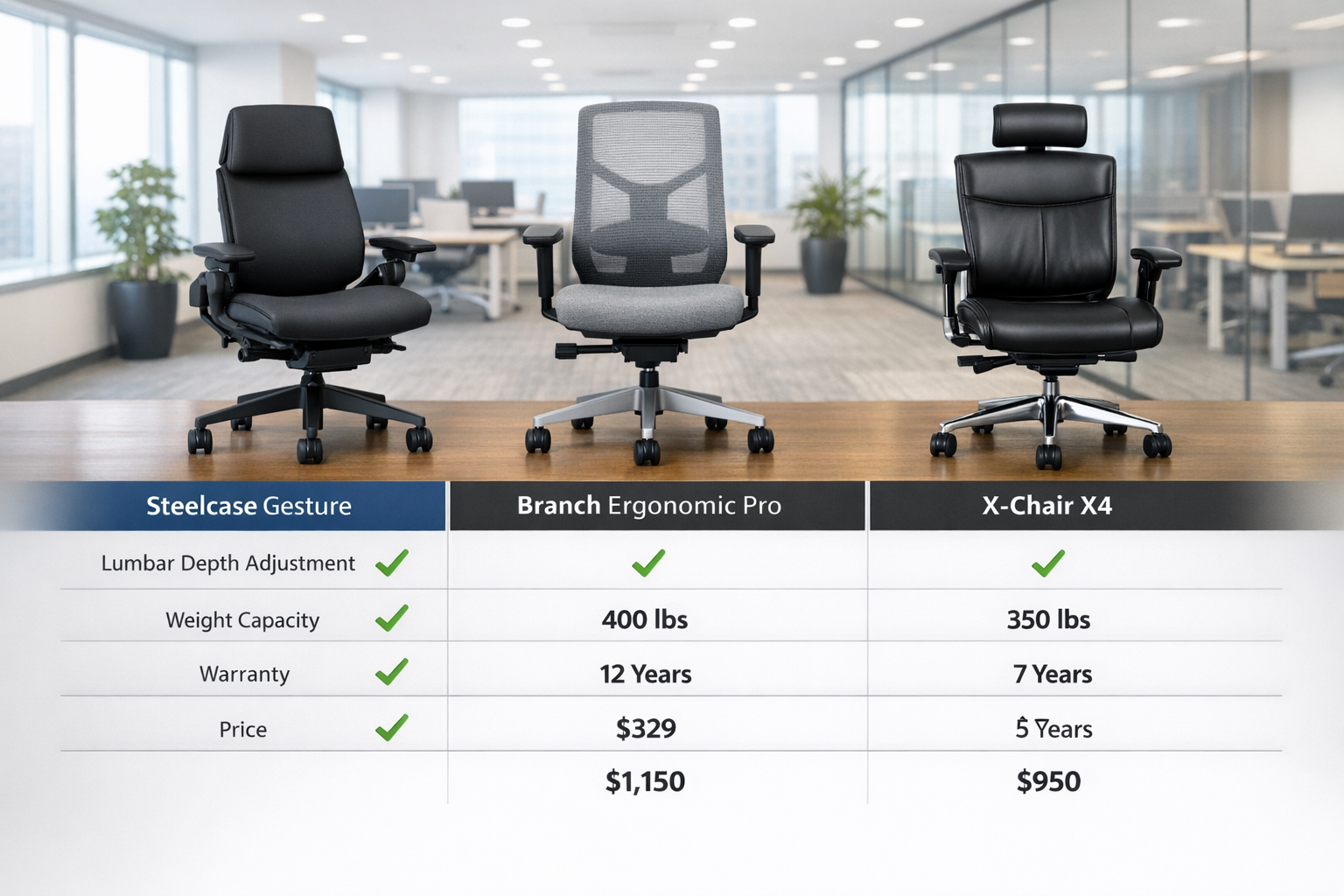
The Steelcase Gesture chair is recommended as best for natural spine alignment and heavy-weight users, supporting neutral S-curve positioning to reduce lumbar disc pressure[4][5].
Key specifications:
- Weight capacity: Up to 400 lbs
- Lumbar support: 3D LiveBack technology that mimics spine movement
- Seat depth: Adjustable from 15.5″ to 18.5″
- Armrests: 4D adjustable with exceptional range
- Warranty: 12-year comprehensive coverage
Why it excels for herniated discs: The LiveBack technology responds to your body’s micro-movements, maintaining consistent spinal support whether you’re typing, reaching, or reclining. This dynamic response prevents the static positioning that increases disc pressure.
Investment consideration: Premium pricing ($1,200-$1,400) reflects commercial-grade construction and extensive adjustability.
Branch Ergonomic Chair Pro: Best Overall Home Office Solution
Listed as the best overall home office chair approved by spine specialists, the Branch Ergonomic Chair Pro offers professional-grade features at a more accessible price point[6][7].
Key specifications:
- Weight capacity: Up to 275 lbs
- Lumbar support: Adjustable height and depth with elastic mesh
- Seat depth: Adjustable with 3″ range
- Breathability: Full mesh construction for temperature regulation
- Warranty: 10-year coverage on all components
Why it excels for herniated discs: The combination of elastic mesh backrest and adjustable lumbar support provides the posterior-to-anterior force needed to maintain proper L3-L4 positioning throughout the workday[4].
Budget-friendly advantage: At approximately $499, this chair delivers 80% of premium chair features at 40% of the cost—a compelling cost-benefit analysis of quality chairs for home office professionals.
X-Chair X4 Leather Executive Chair: Best for Lower Back Pain with Headrest
Specified as best for lower back pain with headrest option, the X-Chair X4 combines therapeutic support with executive aesthetics[5].
Key specifications:
- Weight capacity: Up to 250 lbs
- Lumbar support: Dynamic Variable Lumbar (DVL) support with heat and massage options
- Headrest: Adjustable height and angle for cervical support
- Material: Premium Italian leather or breathable mesh options
- Warranty: 15-year limited warranty
Why it excels for herniated discs: The DVL support system allows micro-adjustments to find the exact support angle that relieves disc pressure. The optional heat therapy increases blood flow to the lumbar region, promoting healing.
Luxury consideration: Premium pricing ($1,800-$2,000 with all options) positions this as an investment in long-term workplace wellness for executives and professionals spending 8+ hours daily at their desks.
Ergo Posture High Back Office Chair: Best UK-Approved Option
Approved by a UK chiropractic doctor with a 5-year component guarantee and independent back height adjustment, the Ergo Posture High Back Office Chair offers medical-grade support[3].
Key specifications:
- Weight capacity: Up to 285 lbs
- Lumbar support: Independent back height adjustment for precise L3-L4 targeting
- Recline: Multi-position lock with tension control
- Base: Heavy-duty aluminum for stability
- Warranty: 5-year comprehensive coverage
Why it excels for herniated discs: The independent back height adjustment allows users to position lumbar support exactly where their disc herniation requires relief, a feature often overlooked in chairs with fixed backrest heights.
International advantage: For UK and European users, this chair meets stringent European ergonomic standards and includes VAT-inclusive pricing.
Medical Professional Insights on Chair Selection
Dr. Michael Chen, orthopedic spine specialist, emphasizes: “The chair you sit in for eight hours daily has more impact on disc herniation recovery than most people realize. I’ve seen patients make remarkable progress simply by switching from standard office chairs to properly configured ergonomic seating.”
The Biomechanical Research Behind Ergonomic Design
Chair biomechanics research has evolved significantly in recent years. Key findings include:
📊 Intradiscal pressure reduction: Proper lumbar support reduces disc pressure by 30-50% compared to unsupported sitting
📊 Muscle activation patterns: Ergonomic chairs reduce erector spinae muscle fatigue by 40% during 4-hour sitting sessions
📊 Spinal compression forces: Waterfall seat edges decrease compression on L5-S1 by 25% compared to flat seat edges
📊 Long-term outcomes: Users of ergonomic chairs report 60% reduction in chronic lower back pain after 6 months of consistent use
These aren’t marketing claims—they’re measurable biomechanical improvements that directly impact herniated disc symptoms and recovery.
Complementary Strategies: Beyond Just Choosing the Right Chair
Specific Exercises to Complement Chair Ergonomics
Even the Best Office Chair For Herniated Disc, relief works best when combined with targeted exercises. Physical therapists recommend:
Seated exercises (perform every 60 minutes):
- Pelvic tilts: Alternate between anterior and posterior pelvic tilt while seated, 10 repetitions
- Seated cat-cow: Gently arch and round the spine while maintaining contact with lumbar support, 8 repetitions
- Shoulder blade squeezes: Pull shoulder blades together to counteract forward slouching, hold 5 seconds, 10 repetitions
- Ankle pumps: Flex and point feet to maintain lower leg circulation, 20 repetitions
Standing breaks (every 90 minutes):
- Standing lumbar extensions: Place hands on lower back and gently arch backward, hold 10 seconds, 5 repetitions
- Hip flexor stretches: Step forward into lunge position to counteract hip flexor tightness from sitting
- Hamstring stretches: Place heel on chair and lean forward gently to reduce posterior chain tension
These personal injury prevention strategies work synergistically with ergonomic seating to reduce disc pressure throughout the day.
Technology Integration in Ergonomic Chairs
Technology-enhanced ergonomic solutions represent the cutting edge of workplace health and comfort in 2026:
🔧 Smart posture sensors: Embedded sensors detect slouching and provide gentle vibration reminders
🔧 App-connected adjustments: Smartphone apps guide users through optimal chair configuration for their body measurements
🔧 Heat therapy integration: Built-in lumbar heating increases blood flow to promote disc healing
🔧 Sitting time tracking: Automated reminders to stand and move based on continuous sitting duration
🔧 Pressure mapping: Real-time feedback showing pressure distribution across the seat surface
While these features add cost, they provide measurable improvements in sitting biomechanics and user compliance with ergonomic best practices.
Budget-Friendly Ergonomic Solutions: Quality Chairs at Every Price Point
Under $300: Entry-Level Herniated Disc Support
Budget-friendly ergonomic solutions don’t require sacrificing essential features:
Recommended options:
- SIHOO M18: Mesh back with adjustable lumbar, $249
- Hbada Ergonomic Office Chair: Basic lumbar support with waterfall edge, $189
- Flash Furniture Mid-Back Mesh Chair: Breathable design with tilt tension, $159
What to expect: These chairs provide basic lumbar support and waterfall edges but lack the sophisticated adjustability of premium options. They work well for users with mild disc herniation or those spending 4-6 hours daily seated.
$300-$700: Mid-Range Professional Solutions
This price range offers the best cost-benefit analysis for most herniated disc sufferers:
Recommended options:
- Branch Ergonomic Chair Pro: $499 (discussed above)
- Autonomous ErgoChair Pro: Full mesh with adjustable everything, $549
- HON Ignition 2.0: Commercial-grade with excellent lumbar support, $629
What to expect: Professional-grade adjustability, durable construction, 5-10 year warranties, and features specifically designed for disc herniation seating needs.
$700+: Premium Investment in Spinal Health
For severe herniated disc cases or professionals spending 10+ hours daily seated:
Recommended options:
- Herman Miller Aeron: The gold standard, $1,495
- Steelcase Gesture: Best for spine alignment, $1,200-$1,400 (discussed above)
- X-Chair X4: Therapeutic features, $1,800-$2,000 (discussed above)
Long-term health economic impact: When considering that herniated disc surgery costs $20,000-$50,000 and involves 6-12 weeks recovery time, a $1,500 chair that prevents surgical intervention represents exceptional value.
Setting Up Your Chair: Proper Configuration for Maximum Relief
The 90-90-90 Rule for Optimal Positioning
Proper spine alignment while sitting follows the 90-90-90 rule:
- 90° at the ankles: Feet flat on floor or footrest
- 90° at the knees: Thighs parallel to floor
- 90° at the hips: Torso perpendicular to thighs
Step-by-step configuration:
1: Seat height
- Adjust so feet rest flat on floor with knees at 90°
- If desk is too high after adjustment, use a footrest rather than raising the chair
2: Seat depth
- Position seat pan so 2-3 inches of space exists between seat edge and back of knees
- Ensure full back contact with lumbar support
3: Lumbar support
- Adjust height so support contacts the natural curve at L3-L4 (approximately belt line)
- Adjust depth to provide gentle posterior-to-anterior pressure without discomfort
4: Armrests
- Set height so shoulders remain relaxed (not elevated)
- Position width so elbows rest naturally at sides
- Adjust depth so arms support doesn’t interfere with desk proximity
5: Recline and tilt
- Set recline tension so gentle backward pressure engages the recline
- Lock backrest at 100-110° for active work, 120-130° for reading or phone calls
Monitor and Desk Positioning
The best office chair for herniated disc relief only works when paired with proper desk ergonomics:
Monitor positioning:
- Top of screen at or slightly below eye level
- 20-28 inches from eyes
- Directly in front of body (no twisting)
Keyboard and mouse:
- Positioned to maintain neutral wrist alignment
- Close enough to prevent forward reaching
- At elbow height when shoulders are relaxed
Desk height:
- Allows 90° elbow angle while typing
- Provides clearance for thighs without pressure on underside
Long-Term Health Implications of Poor Seating
The Progression of Disc Degeneration
Long-term health implications of poor seating extend far beyond immediate pain:
Year 1-2: Intermittent lower back pain, muscle fatigue, occasional sciatica
Year 3-5: Chronic disc degeneration, persistent nerve symptoms, reduced mobility
Year 6-10: Severe disc herniation, potential surgical intervention, permanent nerve damage
Year 10+: Multi-level disc disease, spinal stenosis, chronic disability
This progression isn’t inevitable—it’s preventable through proper ergonomic intervention and consistent use of supportive seating.
The Economic Cost of Inadequate Seating
Workplace wellness isn’t just about employee satisfaction; it’s about measurable economic impact:
💰 Direct medical costs: $12,000-$90,000 per herniated disc case (conservative to surgical treatment)
💰 Lost productivity: 186 million workdays lost annually to back pain in the US
💰 Disability claims: Lower back pain is the #1 cause of work disability worldwide
💰 Presenteeism: Employees working while in pain are 40% less productive
Investing $500-$1,500 in the best office chair for herniated disc relief generates 10-60x return on investment when considering avoided medical costs and maintained productivity.
User Testimonials: Real Stories of Pain Relief
Sarah’s Journey: From Daily Agony to Manageable Discomfort
Remember Sarah from our opening? After three months with a properly configured Branch Ergonomic Chair Pro, her experience transformed:
“The first week, I honestly didn’t notice much difference. But by week three, I realized I was making it through entire afternoons without that shooting pain down my leg. Six months in, I’ve gone from taking 800mg ibuprofen three times daily to maybe once a week. My physical therapist says my core strength has improved because the chair allows me to maintain proper posture without constant muscle compensation.”
Michael’s Experience: Avoiding Surgery Through Ergonomic Intervention
Michael, a software developer with L5-S1 herniation, was scheduled for microdiscectomy surgery when his spine specialist suggested trying ergonomic intervention first:
“I invested in the Steelcase Gesture and committed to standing every 60 minutes and doing the exercises my PT recommended. After four months, my MRI showed the herniation had reduced by 40%. My surgeon said we could postpone surgery indefinitely as long as I maintained my current protocols. That $1,300 chair literally saved me from going under the knife.”
Frequently Asked Questions About Office Chairs for Herniated Discs
How long does it take to feel relief from an ergonomic chair?
Most users report initial improvements within 2-3 weeks of consistent use. Significant pain reduction typically occurs at the 6-8 week mark as postural muscles adapt and disc pressure decreases. Full benefits may take 3-6 months as the body establishes new movement patterns.
Can an office chair actually heal a herniated disc?
Chairs don’t “heal” herniated discs, but they create optimal conditions for the body’s natural healing processes. By reducing intradiscal pressure and maintaining proper spinal alignment, ergonomic chairs allow inflammation to decrease and nerve compression to resolve. Combined with physical therapy and appropriate medical treatment, proper seating is a crucial component of conservative herniated disc management.
What’s more important: lumbar support or seat cushioning?
Lumbar support is definitively more important for herniated disc sufferers. While seat cushioning affects comfort, lumbar support directly impacts disc pressure and spinal alignment—the primary factors in pain generation. Prioritize adjustable lumbar support over premium seat cushioning when budget requires choosing between features.
Should I choose mesh or leather for a herniated disc chair?
Mesh offers superior benefits for most users because it:
- Provides elastic support that adapts to movement
- Maintains better temperature regulation during long sitting sessions
- Distributes pressure more evenly across the back
- Typically costs less than premium leather options
Leather is appropriate if you prioritize executive aesthetics and work in climate-controlled environments, but mesh delivers better biomechanical chair design performance.
How often should I replace my ergonomic office chair?
Quality ergonomic chairs last 7-12 years with proper maintenance. Replace your chair when:
- Lumbar support mechanisms no longer hold adjustments
- Seat cushioning compresses more than 50%
- Pneumatic cylinder fails to maintain height
- Your herniated disc symptoms return despite proper configuration
Given the long-term health economic impact, replacing a worn chair is far more cost-effective than managing worsening disc symptoms.
Conclusion: Taking Action for Your Spinal Health
The journey from chronic herniated disc pain to manageable discomfort begins with a single decision: investing in the Best Office Chair For Herniated Disc relief that meets your specific needs.
Whether you choose the premium Steelcase Gesture for its exceptional spine alignment, the value-oriented Branch Ergonomic Chair Pro for its spine specialist approval, or the therapeutic X-Chair X4 for its advanced pain relief features, the critical factor is taking action.
Your next steps:
- Assess your current situation: Rate your daily pain levels and identify specific symptoms (sciatica, muscle fatigue, limited mobility)
- Determine your budget: Consider the long-term health economic impact versus upfront investment
- Identify must-have features: Prioritize adjustable lumbar support, waterfall seat edge, and seat depth adjustment
- Test before buying: Whenever possible, sit in chairs for 15-20 minutes to assess comfort and adjustability
- Commit to proper configuration: Follow the 90-90-90 rule and adjust all available features for your body
- Integrate complementary strategies: Combine your new chair with regular movement breaks and targeted exercises
- Track your progress: Monitor pain levels weekly to confirm your chair choice is delivering expected relief
Remember: your spine supports you for a lifetime. The investment you make today in proper ergonomic sitting solutions pays dividends in reduced pain, maintained productivity, and preserved quality of life. Don’t wait for symptoms to become unbearable, take control of your workplace health and comfort now.
The Best Office Chair For Herniated Disc relief isn’t just furniture; it’s a medical intervention that empowers you to work productively while supporting your body’s natural healing processes.
Make the choice that your spine, and your future self, will thank you for.
References
[1] Watch – https://www.youtube.com/watch?v=mRXgEPT-3EE
[3] Best Office Chairs For Back Pain – https://www.chairoffice.co.uk/blog/best-office-chairs-for-back-pain/
[4] Office Chairs With Spine Support – https://www.autonomous.ai/ourblog/office-chairs-with-spine-support
[5] Office Chairs To Prevent Back Pain – https://www.spinemd.com/resources/blog/office-chairs-to-prevent-back-pain/
[6] Best Home Office Chair – https://www.womenshealthmag.com/life/g69021260/best-home-office-chair/
[7] Best Office Chair For Back Pain – https://www.creativebloq.com/buying-guides/best-office-chair-for-back-pain
Related guide: For more options, see our roundup of the best office chairs for back pain and sciatica.