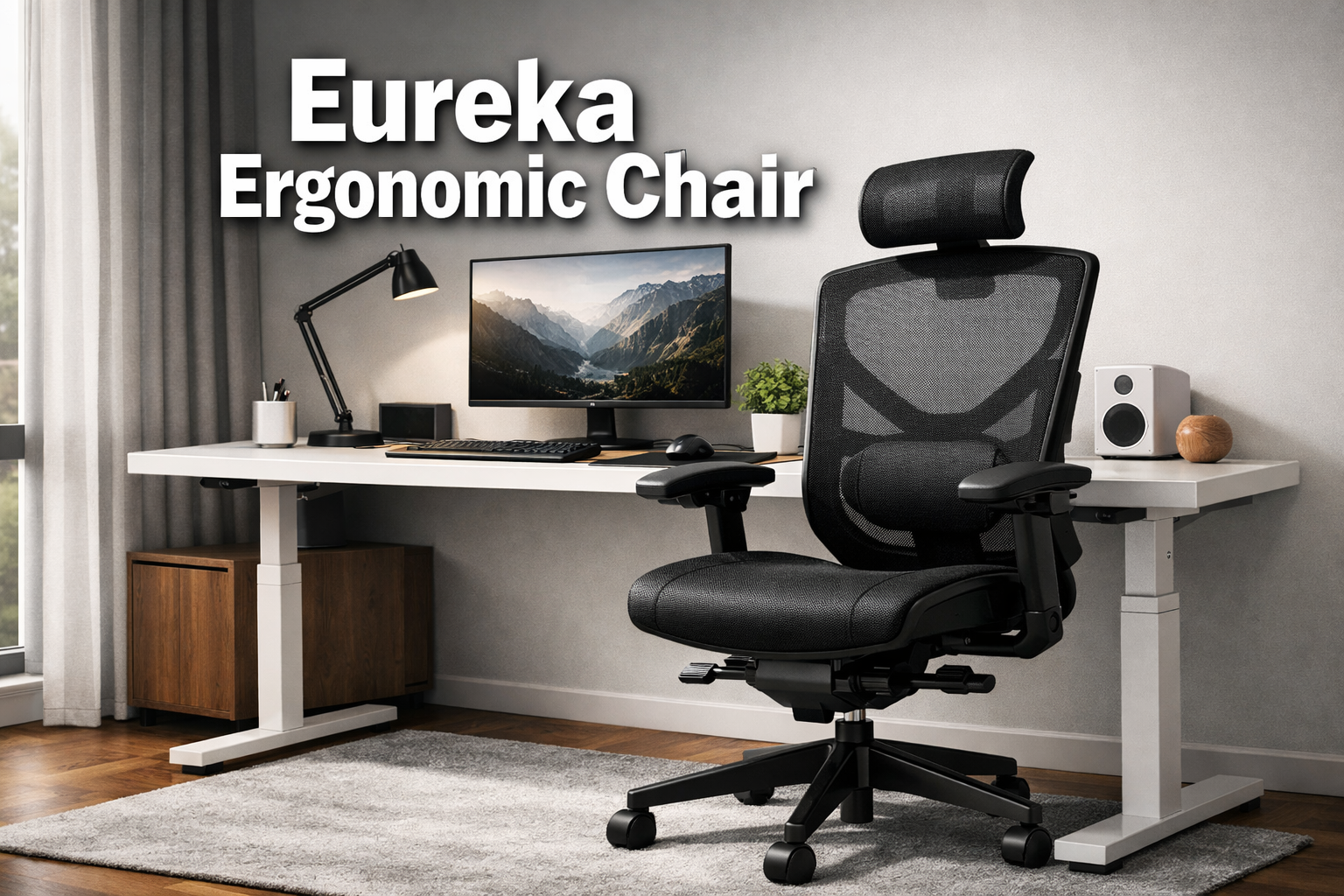
Eureka Ergonomic Chair
Last updated: April 15, 2026
Quick Answer: The Eureka Ergonomic Chair delivers genuine lumbar support through a spring-based dynamic mechanism, a structurally distinct dual-back frame, and a 3D adjustable armrest system, making it a strong choice for professionals and students who sit for six or more hours daily.
It earns its price through BIFMA-tested construction, breathable mesh, and a molded foam seat that holds its shape over time.
Key Takeaways
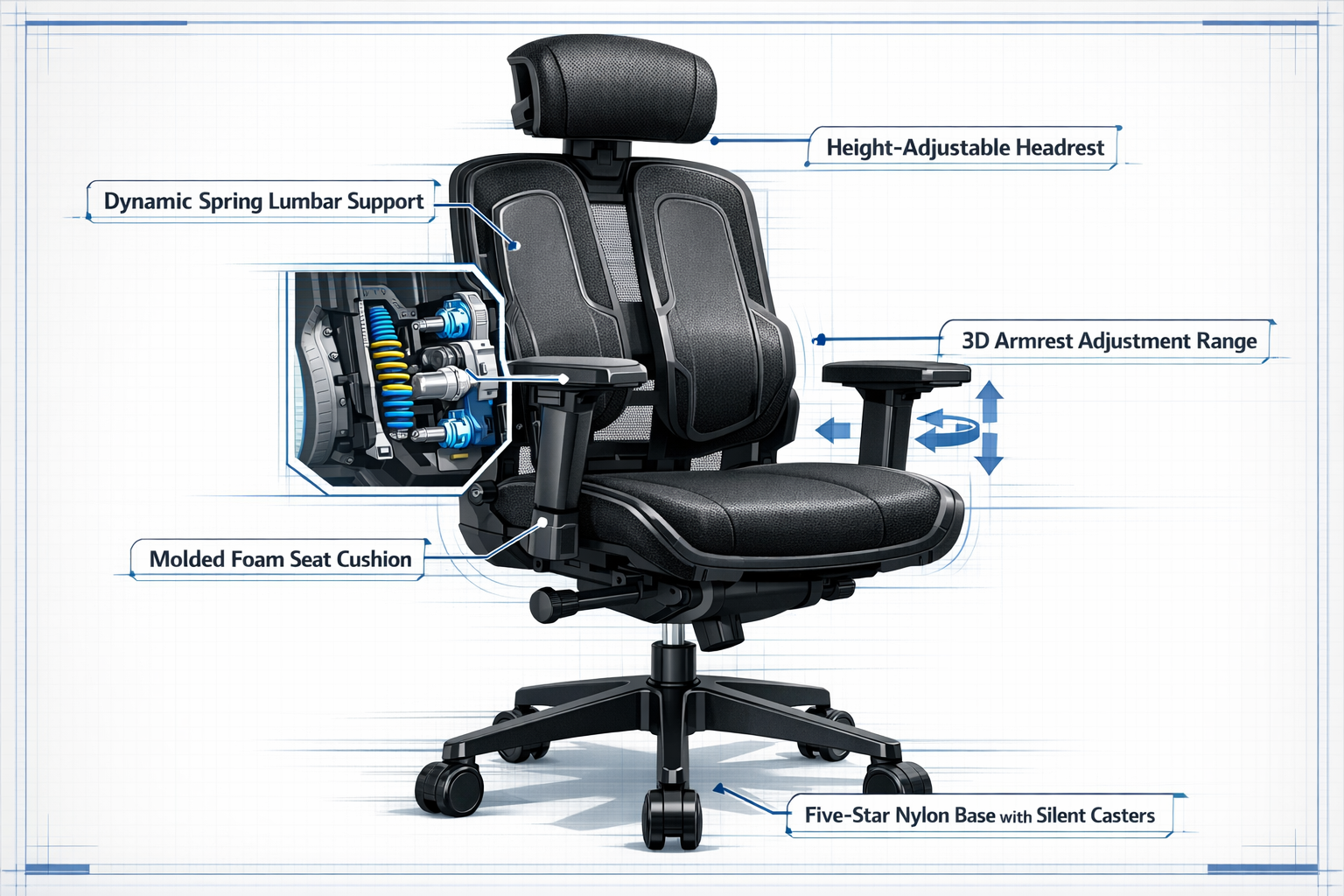
- The dynamic spring lumbar system automatically adjusts to posture shifts, unlike static foam pads that stay fixed
- A dual-back frame adds structural integrity that single-frame chairs can’t match for long-term support
- 3D armrests adjust forward 6cm, up/down 7cm, and swivel 15° covering most desk work positions
- The two-stage recline reaches 120° while keeping the lumbar curve intact
- An adjustable headrest supports the cervical spine in both upright and reclined positions
- BIFMA certification confirms the chair meets independent load and durability standards
- Breathable mesh back and molded foam seat work together to reduce heat buildup during long sessions
- Best suited for users who prioritize spinal alignment over purely aesthetic chair design
- Competes well against similarly priced ergonomic desk chairs when evaluated on lumbar technology alone
- Available on Amazon — Check Current Pricing and Availability
What Is the Eureka Ergonomic Chair and Who Is It For?
The Eureka Ergonomic Chair is a home office and workplace seating solution built around two core engineering priorities: dynamic lumbar support and structural frame stability.
It’s designed for people who spend extended hours at a desk, whether that’s a remote worker, a student, or a professional in a traditional office setting.
This isn’t a gaming chair with aggressive styling or a budget seat with minimal adjustment.
It sits in the category of posture support chairs that prioritize biomechanical function over flashy aesthetics.
If you’re comparing it to a basic adjustable desk chair from a big-box store, the difference shows up within the first week of use, particularly in how your lower back feels by end of day.
Choose this chair if:
- You sit for 5+ hours daily and experience lower-back fatigue
- You want lumbar support that moves with you, not against you
- You need armrests that adapt to different task types (typing, mouse work, video calls)
- You’re setting up a home office and want a chair that holds up over years, not months
It may not be ideal if:
- You need a chair rated for heavier weight capacities (check specifications before purchasing)
- You strongly prefer a leather or fabric seat over mesh
- You want a fully reclinable lounge-style chair for casual use
How Does the Dynamic Spring Lumbar Support Actually Work?
Most budget ergonomic chairs use a static foam pad or a fixed plastic lumbar curve. The Eureka Ergonomic Chair takes a different approach: a spring-based lumbar mechanism that responds to your body’s movement in real time.
When you shift forward to type, lean back to think, or rotate to reach something on your desk, the spring system follows that movement. It maintains contact with your lumbar curve rather than losing support the moment you move away from a fixed position.
This matters because the human spine isn’t static, it shifts constantly throughout the day, and a lumbar system that can’t track those shifts stops being useful within the first hour.
“Static lumbar pads work best when you never move. Spring-based systems work best for everyone else.”
Why this matters for spinal health:
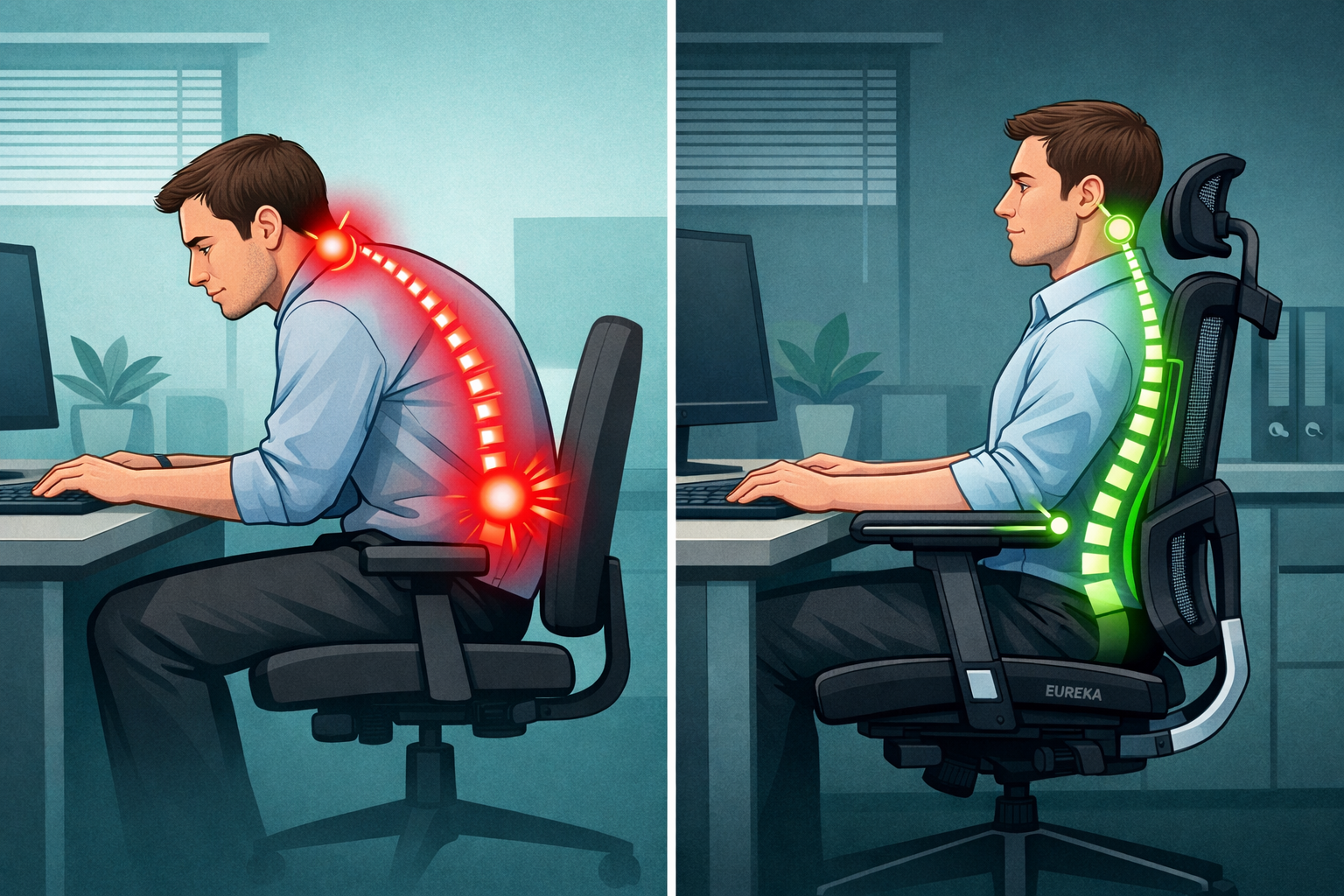
- Continuous lumbar contact reduces cumulative pressure on the L4–L5 vertebral region
- Consistent support helps prevent the forward pelvic tilt that leads to slouching
- Reduces muscle fatigue in the erector spinae muscles that compensate when support disappears
For a deeper look at how lumbar support choices affect your posture long-term, see our guide on choosing a lumbar support chair.
What Makes the Dual-Back Frame Different From Standard Chair Designs?
Single-back frame chairs, which make up the majority of the market, rely on one structural column to support the entire backrest. Under sustained load and repeated recline cycles, that single frame can flex, creak, or gradually lose alignment.
The Eureka Ergonomic Chair uses a dual-back frame that distributes structural load across two reinforced columns. This does two things: it keeps the backrest rigid under pressure, and it gives the lumbar spring mechanism a stable platform to operate from.
A lumbar system mounted on a flexing frame delivers inconsistent support, the dual frame eliminates that variable.
The ventilated mesh back works alongside this structure to manage heat. Breathable mesh allows air to circulate behind your back during long sessions, which reduces the discomfort that builds up with solid foam or leather backs.
Eureka Ergonomic’s own materials research confirms that mesh and hybrid designs consistently outperform solid backs for airflow during extended sitting [2].
Structural comparison at a glance:
| Feature | Single-Back Frame | Eureka Dual-Back Frame |
|---|---|---|
| Load distribution | Single column | Two reinforced columns |
| Lumbar platform stability | Variable under load | Consistent |
| Long-term frame integrity | Moderate | Higher |
| Heat management | Depends on material | Ventilated mesh standard |
| Recline consistency | May flex | Maintained |
How Adjustable Is the Eureka Ergonomic Chair?
Adjustability is where this chair earns its classification as a true ergonomic office chair rather than just a comfortable seat. Here’s what you can actually change:
3D Armrests:
- Forward/backward: 6cm range
- Up/down: 7cm range
- Swivel: 15° in each direction
- PU soft-surface arm pads for skin-friendly contact
Headrest:
- Height-adjustable lift mechanism
- Supports cervical spine in both upright and reclined positions
- Reduces neck and shoulder strain during prolonged desk work
Seat Height:
- Three-stage gas stem for seat height adjustment
- Accommodates a range of desk heights and user leg lengths
Recline:
- Two-stage self-weight recline system
- Reclines up to 120°
- Resistance adapts to user weight, heavier users get proportionally firmer resistance
The 3D armrest range is particularly useful for people who switch between tasks. Typing requires a different arm position than using a mouse or reading on a second monitor.
Being able to swivel and reposition armrests without getting up keeps your workflow uninterrupted.
For more on setting up an ergonomic workspace around your chair, our posture improvement guide covers desk height, monitor placement, and seating angles together.
What Does BIFMA Certification Mean for This Chair?
BIFMA (Business and Institutional Furniture Manufacturers Association) certification is an independent testing standard that verifies a chair can handle repeated load cycles, stress points, and durability benchmarks that reflect real-world use.
For buyers, BIFMA testing answers a practical question: will this chair hold up under daily use for years, or will it degrade within months?
A chair that passes BIFMA testing has been evaluated for:
- Seat and back static load strength
- Armrest durability under lateral force
- Base and caster stability
- Gas cylinder reliability over repeated adjustment cycles
The Eureka Ergonomic Chair’s five-star nylon base and silent casters are part of this tested package. Nylon bases handle floor contact better than cheaper alternatives and resist cracking under lateral stress.
Silent casters protect hardwood and tile floors while moving smoothly across carpet.
This level of construction quality is part of why quality office chairs cost more than basic alternatives, independent testing and certified components add real cost that shows up in long-term durability.
How Does the Eureka Ergonomic Chair Compare to Similar Options?
The mid-range ergonomic chair market is crowded. Here’s how the Eureka Ergonomic Chair positions itself against common alternatives:
Eureka Ergonomic Chair vs. Basic Mesh Desk Chair:
A standard mesh chair offers breathability but typically lacks any dynamic lumbar system. The spring mechanism in the Eureka model provides active support that a passive mesh back simply can’t replicate.
For anyone with existing lower-back sensitivity, the difference is noticeable within a single workday.
Eureka Ergonomic Chair vs. Gaming Chair:
Gaming chairs prioritize aggressive side bolsters and visual styling. They often include fixed lumbar pillows rather than integrated spring systems.
The Eureka chair’s lumbar support is built into the frame, it can’t be forgotten on a shelf or removed. For a broader look at how gaming and ergonomic designs differ, Eureka Ergonomic’s own sizing and ergonomics content covers this distinction well [6].
Eureka Ergonomic Chair vs. Premium Executive Chair:
Premium executive chairs (think $500+) offer more material options, wider adjustment ranges, and often heavier weight capacities.
The Eureka chair doesn’t match those specs, but it delivers the core ergonomic features that matter most (lumbar support, adjustable armrests, headrest) at a significantly lower price point.
Eureka’s own research into executive chair materials shows that mesh and hybrid designs can match leather for support while outperforming it for breathability [5].
For a direct comparison with another well-reviewed mid-range option, see our ELABEST X100 ergonomic chair review.
What Are the Long-Term Health Implications of Sitting in This Chair?
This is the question most chair reviews skip entirely, and it’s the one that matters most for anyone spending 40+ hours per week seated.
Prolonged sitting without proper lumbar support creates a predictable chain of physical consequences: the lumbar curve flattens, the pelvis tilts forward, the thoracic spine rounds, and the head shifts forward to compensate.
Over months and years, this pattern contributes to chronic lower-back pain, neck tension, and reduced hip flexor mobility.
The Eureka Ergonomic Chair’s spring lumbar system directly interrupts this chain at its starting point.
By maintaining lumbar curve support through postural shifts, not just when you’re sitting perfectly still, it reduces the cumulative spinal load that builds up over a long workday.
Practical habits that amplify the chair’s benefits:
- Set a timer to stand or walk for 2–3 minutes every 45–60 minutes
- Pair the chair with a monitor at eye level to prevent forward head posture
- Use the recline function periodically to shift spinal load distribution
- Try simple office stretches during breaks to maintain hip and thoracic mobility
The molded foam seat also plays a role here. Foam that sags over time creates uneven pressure distribution across the sit bones, which contributes to lower-back discomfort.
Molded foam that resists sagging maintains consistent seat geometry, a detail that matters more at the 18-month mark than at unboxing.
For related reading on back-friendly seating choices, our guide to chairs that ease lower back pain covers complementary options and ergonomic principles.
Is the Eureka Ergonomic Chair Worth the Price?
The Eureka Ergonomic Chair delivers strong value for its price tier. The combination of a spring-based lumbar system, dual-back frame, 3D armrests, adjustable headrest, and BIFMA-tested construction is genuinely uncommon at this price point.
Where it delivers clear value:
- Dynamic lumbar support that most chairs at this price don’t offer
- Structural frame integrity that holds up under daily use
- Armrest flexibility that covers most desk work scenarios
- Breathable mesh that keeps comfort levels stable during long sessions
Where expectations should be managed:
- It’s not a premium executive chair, the material quality reflects its price
- Users who need very high weight capacity should verify specifications before purchasing
- The aesthetic is functional rather than statement-making
Eureka Ergonomic’s materials research notes that budget-to-mid-range chairs can deliver professional-grade ergonomic performance when the engineering priorities are right, and the lumbar and frame systems here reflect those priorities [1].
Check the Current Price on Amazon to evaluate it against your specific budget. For comparison shopping across price tiers, our best ergonomic office chair finder covers a range of options by budget and use case.
Frequently Asked Questions
Q: Does the Eureka Ergonomic Chair work for tall users?
A: The three-stage gas stem and adjustable headrest accommodate a range of heights, but very tall users (over 6’3″) should verify the seat height range and headrest reach against their measurements before purchasing.
Q: Can the lumbar support be adjusted or turned off?
A: The spring lumbar mechanism is integrated into the frame and responds to body weight and movement automatically. It doesn’t have a manual on/off switch, but its spring tension adapts to how you sit.
Q: Is the mesh back durable over time?
A: Mesh backed by a dual-frame structure holds its tension better than mesh on a single-column frame. The dual-back design reduces the uneven stress that causes mesh to sag or stretch prematurely.
Q: What flooring is the chair compatible with?
A: The silent casters work on both hard floors (hardwood, tile, laminate) and carpet. They’re designed to protect hard surfaces while rolling smoothly on softer ones.
Q: How difficult is assembly?
A: Most users report assembly takes 20–30 minutes with the included hardware and instructions. The main components — base, gas stem, seat, and back — connect without specialized tools.
Q: Does the recline lock in place?
A: The two-stage self-weight recline system provides resistance based on user weight. Check the product listing for specific locking positions, as recline lock functionality can vary by configuration.
Eureka Ergonomic Chair: FAQs
Q: Is this chair suitable for people with sciatica?
A: Chairs with proper lumbar support and a level seat pan are generally recommended for sciatica management. For a detailed breakdown of what to look for, see our chairs for sciatica relief guide.
Q: How does the 3D armrest compare to 4D armrests?
A: 4D armrests add a lateral slide adjustment (in/out from the seat) that 3D armrests don’t include. The Eureka’s 3D system covers forward/back, up/down, and swivel — sufficient for most users, though those with very wide or narrow shoulder widths may prefer a 4D option.
Q: What is the weight capacity?
A: Verify the current product listing for the exact rated capacity, as specifications can vary by model version. BIFMA testing confirms the chair meets standard commercial load requirements.
Q: How does this chair compare to leather executive chairs?
A: Mesh chairs generally outperform leather for breathability during long sessions, while leather offers a different aesthetic and surface feel. Eureka Ergonomic’s executive chair materials analysis covers this trade-off in detail [5].
Conclusion
The Eureka Ergonomic Chair makes a clear case for itself: dynamic spring lumbar support, a structurally reinforced dual-back frame, flexible 3D armrests, and BIFMA-tested durability — all in a package priced for home office and professional use rather than enterprise procurement budgets.
Actionable next steps:
- Measure your workspace — check desk height, available floor space, and current monitor position before ordering
- Review your current pain points — if lower-back fatigue is your primary issue, the spring lumbar system directly addresses it; if neck strain is the priority, the adjustable headrest is the relevant feature
- Compare against your budget — use our ergonomic chair comparison resources to see how it stacks up at different price tiers
- Order and set up correctly — adjust seat height so your feet are flat on the floor, set armrests so your elbows rest at 90°, and position the headrest to contact your cervical spine without pushing your head forward
- Pair with movement breaks — no chair eliminates the need to move; set a reminder to stand and stretch every hour
View the Eureka Ergonomic Chair on Amazon to check current pricing, available colors, and buyer reviews.
References
[1] Chair Materials Buyers Guide Budget Premium – https://eurekaergonomic.com/a/p/blogs/eureka-ergonomic-blog/chair-materials-buyers-guide-budget-premium
[2] Hybrid Chairs Style Breathability Guide – https://eurekaergonomic.com/a/p/blogs/eureka-ergonomic-blog/hybrid-chairs-style-breathability-guide
[3] Fabric Ergonomic Office Chairs Guide – https://eurekaergonomic.com/a/p/blogs/eureka-ergonomic-blog/fabric-ergonomic-office-chairs-guide
[4] Executive Chair Standing Desk Pairing Guide – https://eurekaergonomic.com/blogs/eureka-ergonomic-blog/executive-chair-standing-desk-pairing-guide
[5] Executive Chair Materials Guide – https://eurekaergonomic.com/a/p/blogs/eureka-ergonomic-blog/executive-chair-materials-guide
[6] Eureka Ergonomic – https://eurekaergonomic.com
- Available on Amazon — Check Current Pricing and Availability