Ergonomic Office Chair with Footrest
If your feet dangle or your legs ache by noon, your chair isn’t fitting your body, it’s just sitting under it.
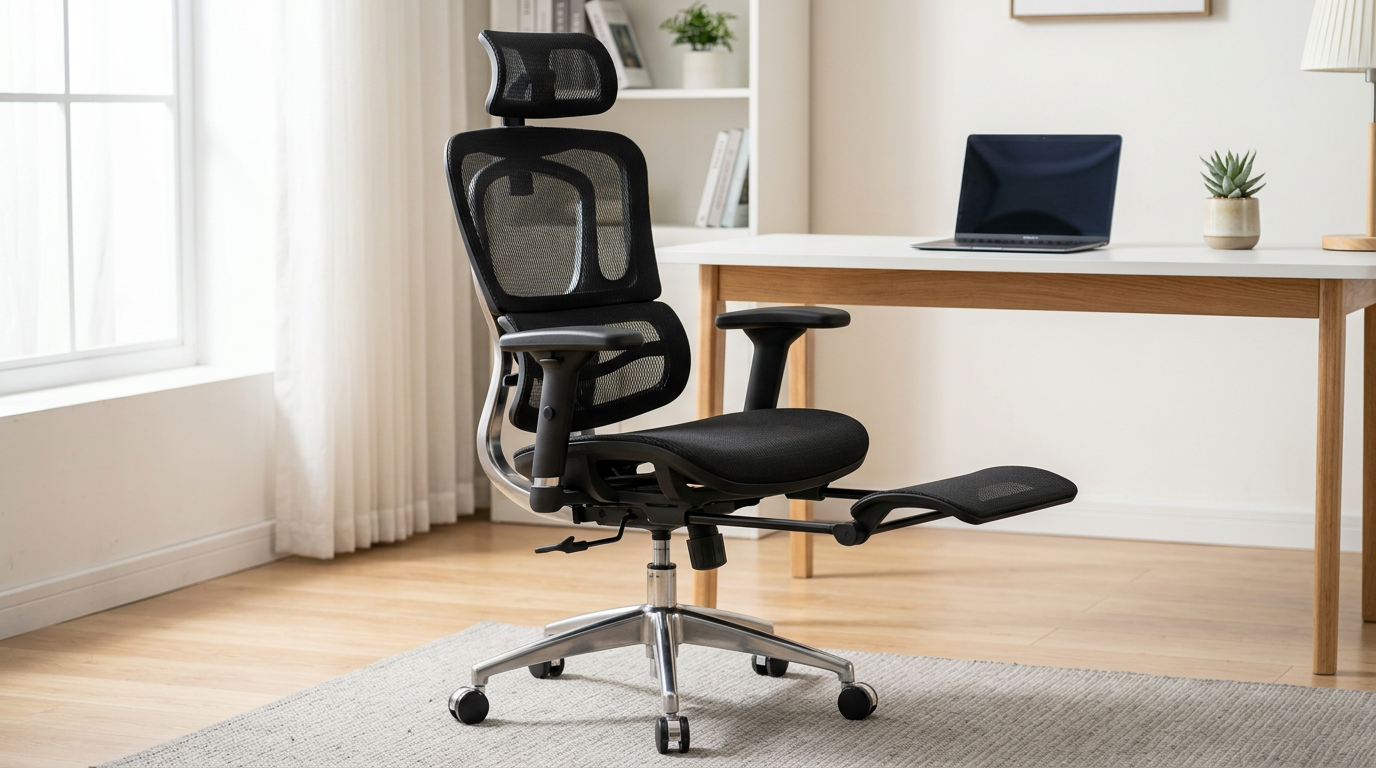
The right Ergonomic Office Chair with Footrest solves this directly, either with a built-in retractable panel or a compatible footrest ring.
After reviewing dozens of options for home office workers and remote professionals who sit six or more hours daily.
Our top pick is the FlexiSpot C7 — 499 five-star reviews, a built-in retractable footrest, and genuine lumbar support at under $350.
How We Picked These 7 Chairs
Every chair on this list had to clear four bars: a built-in footrest mechanism (retractable panel or ring) or verified compatibility with a separate ergonomic footrest; independently adjustable lumbar support; a minimum of 100 verified user reviews; and a price range from $110 to $550 that covers the full spectrum from budget to premium.
We weighted footrest quality and lumbar adjustability most heavily, since those are the two features that directly affect whether home office workers with leg fatigue get real relief or just a gimmick that folds away after day three.
Internal links to full reviews are included where available on Office Chair Outlet.
Quick Comparison: Best Ergonomic Office Chairs with Footrest (2026)
| Rank | Chair | Footrest Type | Price | Best For |
|---|---|---|---|---|
| 1 | FlexiSpot C7 | Built-in retractable | $309.99–$349.99 | Most home office workers |
| 2 | HBADA E3 Pro | Compatible add-on | $479–$549.99 | Premium buyers with back issues |
| 3 | OdinLake O2 (Ergo MAX 747) | Built-in retractable | $549–$829 | Long-session sitters |
| 4 | Boulies EP460 | Built-in retractable | ~$399 | Mesh fans wanting all-in-one |
| 5 | Gabrylly Ergonomic Mesh | Compatible add-on | $216.50 | Budget buyers, bigger frames |
| 6 | Primy Drafting Chair | Integrated footrest ring | $108.86 | Standing desk users |
| 7 | Autonomous ErgoChair Pro+ | Compatible add-on | $499–$529 | Tall users with custom setups |
Built-in Footrest vs. Separate Footrest: Which Is Worth It?
There’s a persistent debate on r/OfficeChairs and r/LooksUseful that built-in chair footrests are gimmicks, and honestly, some are.
Cheap retractable panels that only extend four inches, sit at an awkward angle, and can’t be adjusted for height deserve that criticism.
But the better built-in designs (FlexiSpot C7, OdinLake O2, Boulies EP460) extend meaningfully, 10 to 14 inches, and fold away completely when you don’t need them.
That convenience is real: no reaching under the desk for a separate pad, no tripping hazard, no purchasing decision.
Choose a built-in footrest if you’re under 5’7″, work at a fixed desk height, and want everything in one package.
Choose a separate ergonomic footrest if you already own a premium chair you love (Herman Miller, Steelcase, HBADA E3 Pro), sit at multiple workstations, or prioritize barefoot comfort, padded options like the Everlasting Comfort ($29) or Cushion Lab ($55) beat any chair’s hard plastic panel for sock-covered feet.
For a full breakdown of standalone footrests, see our guide to the best ergonomic footrests.
The 7 Best Ergonomic Office Chairs with Footrest for Home Office Workers
1. FlexiSpot C7 — Editor’s Choice

The FlexiSpot C7 is a full-mesh ergonomic chair with a built-in retractable footrest, priced at $309.99–$349.99, and it’s the most well-rounded option on this list.
Its footrest earns that position: the retractable panel extends to support the calves, not just the feet, which is the key functional difference between the C7’s mechanism and the shorter panels on cheaper chairs.
Paired with sacral cradling lumbar support that locks at its highest position to actively brace the lower spine, this chair addresses the two most common complaints from home office workers simultaneously, leg fatigue and lower-back ache.
Key features for home office workers who sit 6+ hours daily:
- Built-in retractable footrest with full calf-to-foot support
- Sacral cradling lumbar support with depth-locking lever
- 3D armrests (height, pivot, width) for varied desk tasks
- Seat height range: 17.7″–21.3″, covering most standard desk heights
- Weight capacity: 300 lbs
- 5.0-star average across 499 verified reviews
Real strengths: That review count at 5.0 stars is rare at this price point — most chairs in the $300 range plateau around 4.3–4.5.
The sacral cradle is genuinely different from a lumbar bump: it cups the base of the spine rather than just pushing forward, reducing the tendency to slide forward on the seat over long sessions.
Honest tradeoffs: Color options are limited (primarily black). Not ideal for users over 6’2″, the seat back doesn’t extend high enough for tall torsos, and the footrest angle may feel shallow for very long legs.
Price: $309.99 standard; $349.99 for upgraded fabric. Free delivery, 30-day returns.
Best for: Home office workers between 5’2″ and 6’0″ who sit 6–9 hours daily and want a single-purchase solution with no add-ons required.
👉 Read our full FlexiSpot C7 review
2. HBADA E3 Pro — Best Premium Pick
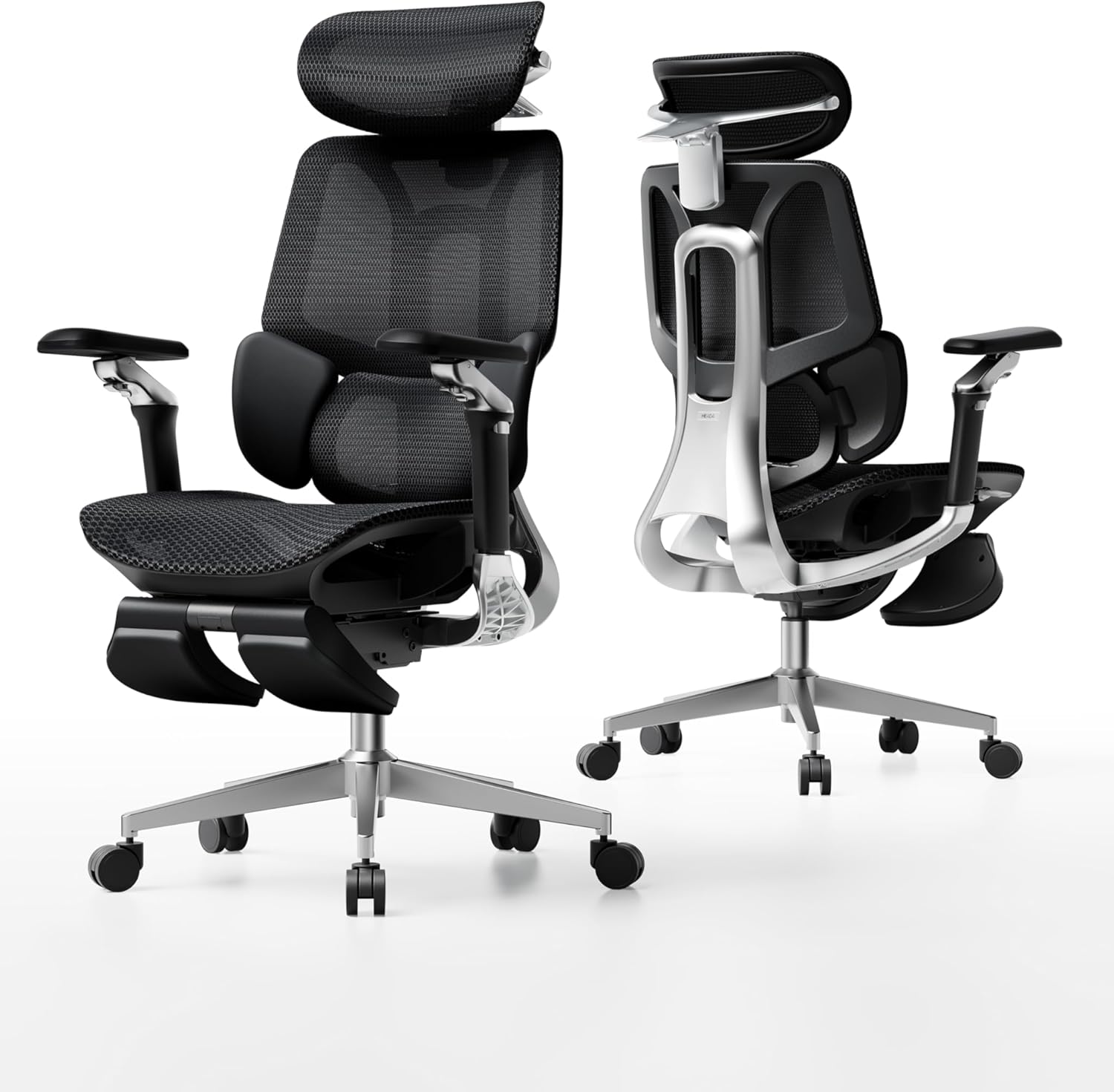
The HBADA E3 Pro is a premium ergonomic chair at $479–$549.99 with a 3-zone dynamic lumbar system and 4D biaxial headrest, best paired with a quality standalone footrest for users who prioritize spinal support above all else.
The E3 Pro doesn’t have a built-in footrest, but it earns this ranking because its ergonomic credentials are the strongest in the sub-$600 market.
The 3-zone lumbar system doesn’t sit static against your back, it has three distinct flex zones that follow your spine as you shift position throughout the day.
Most lumbar systems lose contact the moment you lean slightly forward; the E3 Pro’s dynamic mechanism maintains pressure. That matters during marathon sessions.
Key features for home office professionals with back issues:
- 3-zone dynamic lumbar support with depth and height adjustment
- 4D biaxial headrest (70° rotation, 5.5cm forward/back, 4.5cm vertical)
- 6D armrests covering height, forward/back, width, pivot, angle, and swivel
- Seat height accommodates 4’11″–6’5″
- IGR, BIFMA, SGS, TUV certified; London Design Award recipient
- 3-year warranty with 30-day free returns and 15-day price match
Real strengths: The 6D armrests cover more adjustment axes than nearly anything in this price range, including the ability to angle slightly outward for typing then swing inward for mouse work, reducing shoulder tension for multi-task workflows.
The wide height accommodation (4’11″–6’5″) means it genuinely fits users at both extremes.
Honest tradeoffs: No built-in footrest. At $549.99, you’re adding $29–$55 more for a quality standalone footrest, putting total cost at $580–$605.
Not for buyers who need the footrest baked in and want to stay under $400.
Price: $479–$549.99 depending on configuration. Free delivery, 30-day returns.
Best for: Remote professionals spending 7+ hours at a desk with lower back pain or prior injury who are comfortable sourcing a separate padded footrest.
👉 Read our full HBADA E3 Pro review
3. OdinLake O2 (Ergo MAX 747) — Best for Long Sit Sessions

The OdinLake O2 is a three-section backrest ergonomic chair with a built-in retractable footrest, priced from $549 to $799, designed specifically to balance active work posture and rest-mode recline.
OdinLake built the O2 around the idea that workers alternate between focused-task sitting and rest positions multiple times per day, and the chair’s architecture reflects this.
The three-section backrest adjusts its three zones (upper, mid, lower back) independently, meaning the lumbar curve doesn’t flatten when you recline the way it does on single-piece backrests.
The built-in footrest deploys when the recline angle increases, creating a near-complete lounge position without leaving the chair.
Key features for workers with long, variable sessions:
- Built-in retractable footrest synced with recline mechanism
- Three-section backrest with independent zone adjustment
- Flex Mesh construction rated for 8+ hour sessions
- 4D armrests with wide width adjustment range
- Accommodates users to approximately 6’3″
- 313 verified reviews, 4.6-star average
Real strengths: The synced footrest-and-recline mechanism is the O2’s standout feature, you don’t need to manually deploy the footrest when you lean back; the geometry does it for you.
This makes the transition from work mode to rest mode genuinely frictionless, which matters for users who eat lunch at their desk or take calls in a reclined position.
Honest tradeoffs: Price starts at $549, the most expensive built-in-footrest chair on this list.
At the higher configuration ($799), you’re approaching Herman Miller territory without the 12-year warranty.
Not ideal for budget-conscious buyers or those who rarely use a recline.
Price: $549–$799. Free delivery, 30-day returns.
Best for: Professionals who work marathon sessions with defined rest breaks — writers, developers, analysts, who want work posture and rest posture handled by one chair.
4. Boulies EP460 — Best Retractable Footrest Design
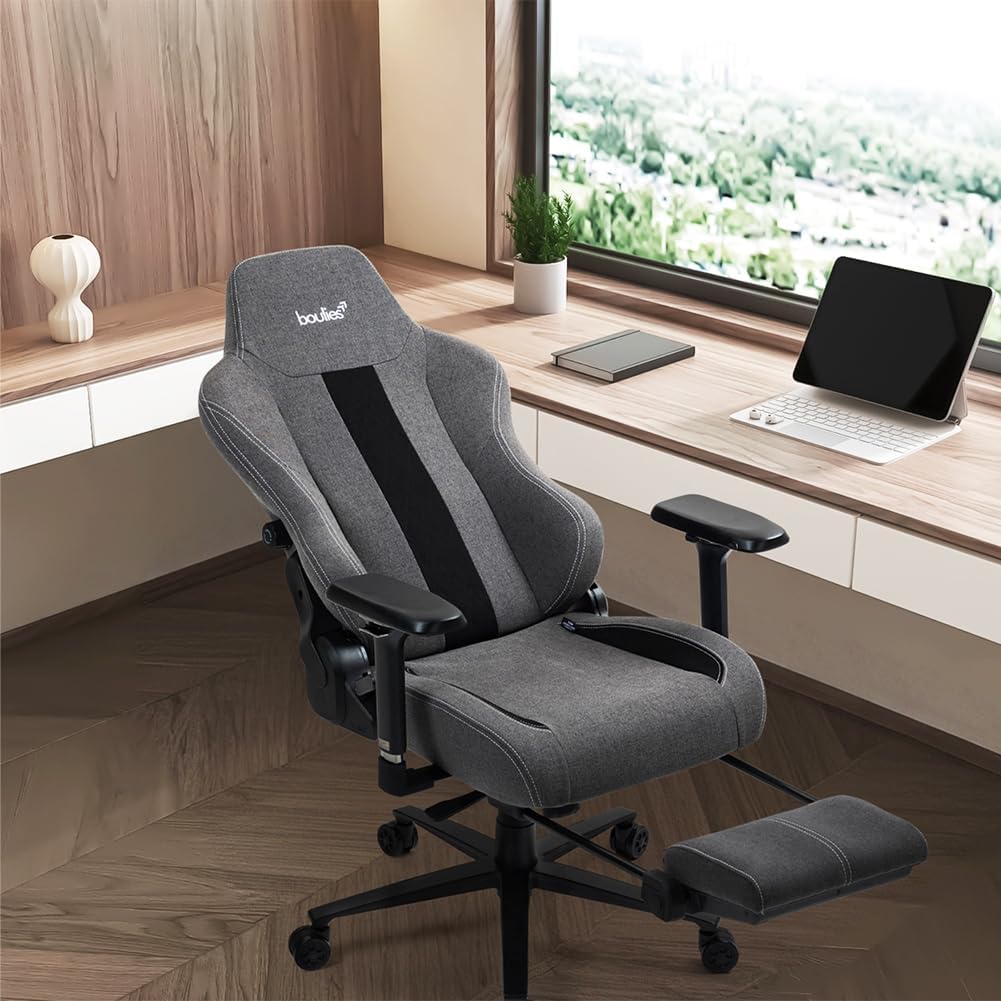
The Boulies EP460 is an ergonomic mesh chair with a built-in retractable footrest, priced at approximately $399, the cleanest footrest mechanism of any chair on this list in terms of deployment and stow.
Where some built-in footrests feel like afterthoughts welded onto the seat base, the EP460’s retractable panel integrates into the seat structure flush when stowed, it doesn’t protrude or create a visual gap under the chair.
Extended, the panel provides solid surface area for both feet with a non-slip texture.
The mesh backrest uses OdinLake adjacent foam engineering behind the mesh layer, giving slightly more pressure distribution than pure-mesh designs.
Key features for mesh-chair fans wanting an all-in-one:
- Integrated retractable footrest flush with seat base when stowed
- Dual-layer mesh back with foam support layer
- Adjustable lumbar support (height and depth)
- 4D armrests
- Weight capacity: 285 lbs
- 91 pages indexed; LD 28.1K, established brand
Real strengths: The flush stow means the EP460 looks like a standard mesh chair when the footrest is in, no awkward hanging plastic.
For users who only occasionally use the footrest (during calls, breaks), this matters aesthetically.
The dual-layer mesh back is softer than single layer alternatives, reducing the “wire mesh against the shoulder blades” sensation that some users get with cheaper mesh.
Honest tradeoffs: 285 lb weight capacity is the lowest on this list, not suitable for heavier users.
The footrest surface works better with shoes than barefoot. Customer support response times have drawn mixed feedback in recent reviews.
Price: ~$399. Check Boulies.com for current pricing and promotions.
Best for: Home office workers who want a clean, all-mesh aesthetic and occasional footrest use, and who weigh under 285 lbs.
👉 Boulies EP460 at Boulies.com
5. Gabrylly Ergonomic Mesh Chair — Best Budget Pick

The Gabrylly Ergonomic Mesh Chair is a full-mesh task chair at $216.50 with a 400-pound weight capacity, the best budget-tier option for larger frames that need footrest compatibility rather than a built-in footrest.
No built-in footrest here, but Gabrylly earns this spot because it’s the only under-$250 chair on the list that can support users up to 400 lbs with a wide (20-inch) seat, and because it pairs well with virtually any standalone footrest.
The 45-degree flip-up armrests allow the chair to tuck fully under the desk, which also means a separate footrest can be positioned cleanly without the chair’s base interfering.
Key features for budget-conscious buyers and larger frames:
- Four-point ergonomic support: head, back, hips, hands
- Full mesh on both seat and backrest for temperature regulation
- Flip-up armrests (45°) for desk clearance and space-saving
- 90°–120° tilt lock with multiple positions
- Seat dimensions: 20″W × 19.3″D, wider than standard
- Weight capacity: 400 lbs; 3-year warranty
Real strengths: The 400 lb capacity at $216.50 is genuinely rare, most chairs at this price cap at 250–300 lbs.
The wider seat accommodates hip widths that cause discomfort in standard 18-inch chairs. Assembly takes 15–20 minutes with all tools included.
Honest tradeoffs: Fixed lumbar curve, you can’t adjust depth or height independently.
Non-adjustable recline tension means users under ~140 lbs may find reclining requires too much force.
Not ideal for users under 5’5″ or over 6’2″.
Price: $216.50. Available on Amazon with standard return window.
Best for: Home office workers between 5’5″ and 6’2″ with larger frames who want a breathable mesh chair and plan to pair it with a separate ergonomic footrest like the Everlasting Comfort ($29) or ErgoFoam ($42).
👉 Read our full Gabrylly review
6. Primy Drafting Chair — Best for Standing Desk Users

The Primy Drafting Chair is a tall-format ergonomic chair with an integrated footrest ring at $108.86, the only option on this list built specifically for standing desk environments.
Standard office chairs can’t reach standing desk heights.
The Primy’s pneumatic cylinder covers an extended height range that standard chairs don’t, and the integrated footrest ring sits at the base of the backrest frame, not a retractable panel, but a permanent circular support that keeps legs from dangling when seated at bar or standing-desk height.
This is the same design principle used in laboratory and drafting stools, and it works well for what it’s designed for.
Key features for standing desk users:
- Integrated footrest ring at elevated seated height
- Extended pneumatic height range compatible with sit-stand desks
- Flip-up armrests (90°) for desk approach
- Adjustable lumbar support with curved mesh backrest
- 3-inch high-density foam seat cushion
- Five-claw base with 360° swivel
Real strengths: At $108.86, it’s the most affordable chair on this list by a wide margin.
It solves a specific problem, “I use a standing desk and my feet dangle when I sit”, better than any non-drafting chair can, regardless of price.
The flip-up armrests genuinely help when moving close to a desk edge.
Honest tradeoffs: The footrest ring doesn’t adjust independently of seat height, it moves with the chair’s overall height, which works for standing-desk users but makes it awkward at standard desk heights where the ring sits too low to be useful.
Not suitable as a primary chair for standard 29–30″ desk heights.
Price: $108.86. Available on Amazon.
Best for: Remote workers with sit-stand desks who need affordable elevated seating where their feet need support at height, architects, engineers, lab workers, or anyone using a 36–40″ work surface.
👉 Read our full Primy Drafting Chair review
7. Autonomous ErgoChair Pro+ — Best for Tall Users with Footrest Add-On

The Autonomous ErgoChair Pro+ is a fully adjustable ergonomic chair at $499–$529, designed for users up to 6’4″ and best paired with a quality standalone footrest for a complete tall-user setup.
Like the HBADA E3 Pro, there’s no built-in footrest, but the ErgoChair Pro+ earns its place here because tall users have almost no built-in-footrest options that actually fit them.
The OdinLake O2 caps at ~6’3″. The FlexiSpot C7 tops out at 6’0″ comfortably.
The ErgoChair Pro+ accommodates up to 6’4″ with a taller seat back, longer seat depth, and wider armrest range that doesn’t feel cramped for larger frames.
Key features for taller users (6’0″–6’4″):
- Seat height range: 17″–20″ with extended gas cylinder options
- 11 adjustment points including seat depth, lumbar height, lumbar flex, and tilt tension
- Fully adjustable lumbar support (depth + height independently)
- 4D armrests with wide lateral range
- Weight capacity: 350 lbs
- Woven mesh backrest; lifetime warranty on frame
Real strengths: The independent lumbar depth and height adjustment is best-in-class for this price tier, you can move the lumbar up to fit a longer torso and push it forward to match your specific spinal curve simultaneously.
The lifetime frame warranty is a genuine differentiator at $499.
Honest tradeoffs: No built-in footrest. Footrest add-on costs $29–$55 extra.
Some users report the armrest padding wearing within 18 months under daily use.
Customer service response times have been inconsistent based on recent community reports.
Price: $499–$529 at Autonomous.ai. Periodic sales bring it below $450.
Best for: Tall users (6’0″–6’4″) who prioritize lumbar precision and seat depth and want to pair the chair with a hard-surface footrest like the Pogo ($152) or 3M Adjustable ($68) for shoes-on use.
What to Look For in an Ergonomic Chair with Footrest
Footrest type and extension range is the first decision. Built-in retractable panels are convenient but vary wildly in quality, measure whether the panel extends at least 10 inches and whether it can be stowed flush.
The FlexiSpot C7 meets both criteria at $349.
Footrest rings are fixed but work well for elevated seated positions (drafting chairs, standing desks). Separate footrests give you more adjustment but require a second purchase.
Lumbar adjustability depth determines whether the chair actually supports your specific spine, or just pushes generically against your lower back.
Fixed lumbar (Gabrylly, basic task chairs) works for average-proportion users but fails at height extremes.
Depth-adjustable lumbar (FlexiSpot C7’s sacral cradle, HBADA E3 Pro 3-zone system) adapts to your curvature.
If you have a history of lower back issues, depth adjustment isn’t optional, see our guide to chairs for lower back pain.
Seat height range vs. your desk height is where footrest relevance begins.
If your desk sits at 29″–30″ and your chair’s seat height at proper ergonomic position leaves your feet 2–4 inches off the floor, a footrest with 3–4 inches of height covers the gap.
If your desk is 36″+ (standing desk), you need a drafting chair with a footrest ring, not a retractable panel.
Weight capacity affects both safety and longevity. Standard chairs cap at 250–300 lbs.
If you’re between 280–400 lbs, the Gabrylly 400-lb rating and reinforced five-point base is the correct starting point in this price range, regardless of footrest preference.
Pair it with a Pogo or 3M footrest for shoes-on desk use.
Frequently Asked Questions
Are office chair footrests actually worth it?
For users whose feet don’t rest flat on the floor when their chair is at the correct height for their desk, yes, meaningfully so. Dangling feet create sustained pressure behind the thighs that reduces circulation and accelerates fatigue in long sessions. For users whose feet already rest flat at their natural sitting height, a footrest adds nothing ergonomically. The test: sit at your desk in your normal posture and check if your feet are flat. If not, a footrest addresses a real problem.
What’s the best ergonomic chair with footrest for short people?
The FlexiSpot C7 is the top pick for users under 5’5″, its built-in retractable footrest, low minimum seat height (17.7″), and sacral lumbar support all fit shorter proportions well. The Boulies EP460 is a strong alternative if you prefer the aesthetic of a flush-stow mechanism. For users under 5’2″ who struggle even with low seat heights, pairing a standard-height chair with a padded footrest (Everlasting Comfort, $29) often gives more height flexibility than a built-in panel. See our guide to chairs for shorter office workers.
Can I add a separate footrest to any ergonomic chair?
Yes, with two caveats. First, check desk clearance, if your desk has a low apron or modesty panel, a separate footrest may not fit alongside the chair’s base. Second, match surface type to your usage: hard-surface footrests (Pogo, 3M) are better with shoes; padded footrests (Everlasting Comfort, ErgoFoam, Cushion Lab) are better barefoot or with socks. Both types are compatible with any chair on this list that lacks a built-in footrest, including the HBADA E3 Pro and Autonomous ErgoChair Pro+.
How much weight can these chairs support?
Across the seven chairs on this list: the Boulies EP460 has the lowest capacity at 285 lbs. The FlexiSpot C7, HBADA E3 Pro, OdinLake O2, and Autonomous ErgoChair Pro+ all support 300–350 lbs. The Gabrylly is rated highest at 400 lbs. The Primy Drafting Chair is built for standard office weight requirements; verify the current spec sheet on Amazon before purchasing if capacity is a critical factor. For users in the 280–400 lb range, the Gabrylly is the correct starting point — its reinforced base and wider seat are genuinely engineered for heavier frames, not just rated and hoped for. See our guide to comfortable office chairs for big people.
Related guide: For more options, see our roundup of the best office chairs with a footrest.