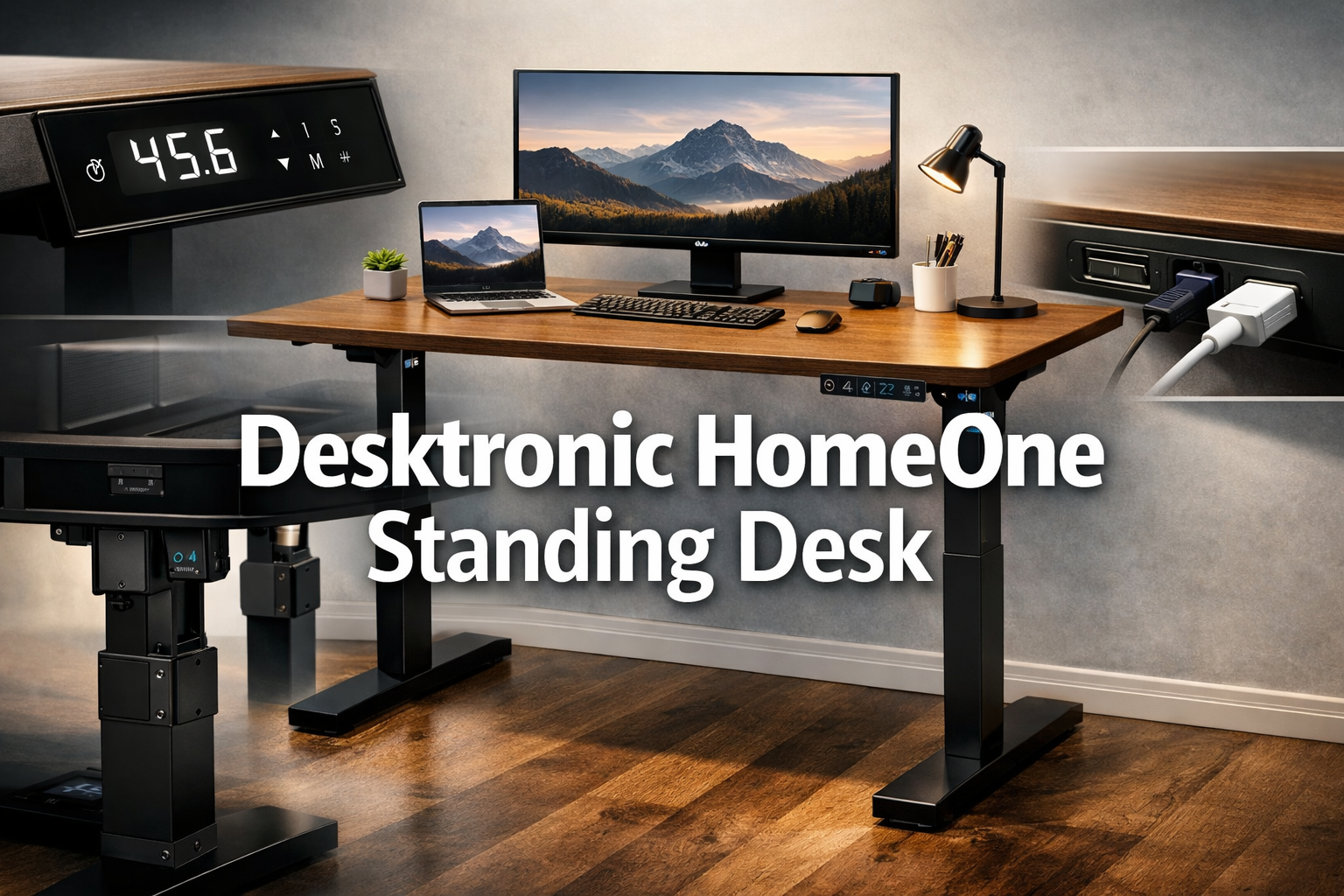
Desktronic HomeOne Standing Desk
Last updated: April 29, 2026
Quick Answer: The Desktronic HomeOne Standing Desk is a well-engineered, European-made sit-stand desk that delivers genuine stability, a dual-motor electric lift, and thoughtful built-in charging at a mid-to-premium price point ($579.99–$599.99).
It’s a strong choice for home office users who prioritize build quality and daily reliability over budget pricing.
If you’re looking for the cheapest standing desk on the market, this isn’t it, but if you want something that holds up over years of use, it earns serious consideration.
Key Takeaways
- The Desktronic HomeOne is a 54×28-inch electric sit-stand desk manufactured in Europe, priced between $579.99 and $599.99 depending on configuration.
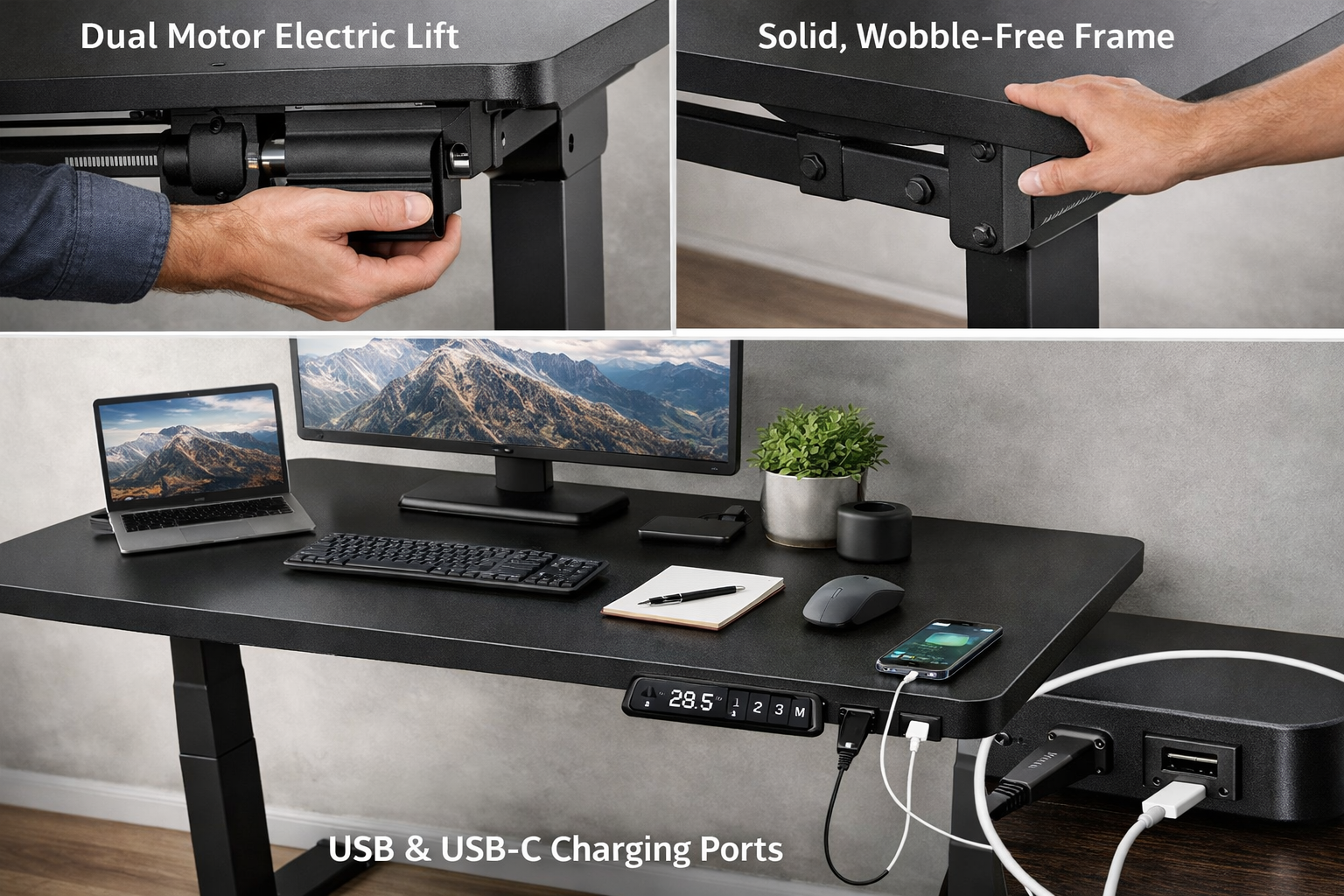
- It uses a dual-motor system for smooth, even height adjustment, a meaningful advantage over single-motor designs at this size.
- Built-in USB and USB-C charging ports reduce cable clutter without requiring a separate hub.
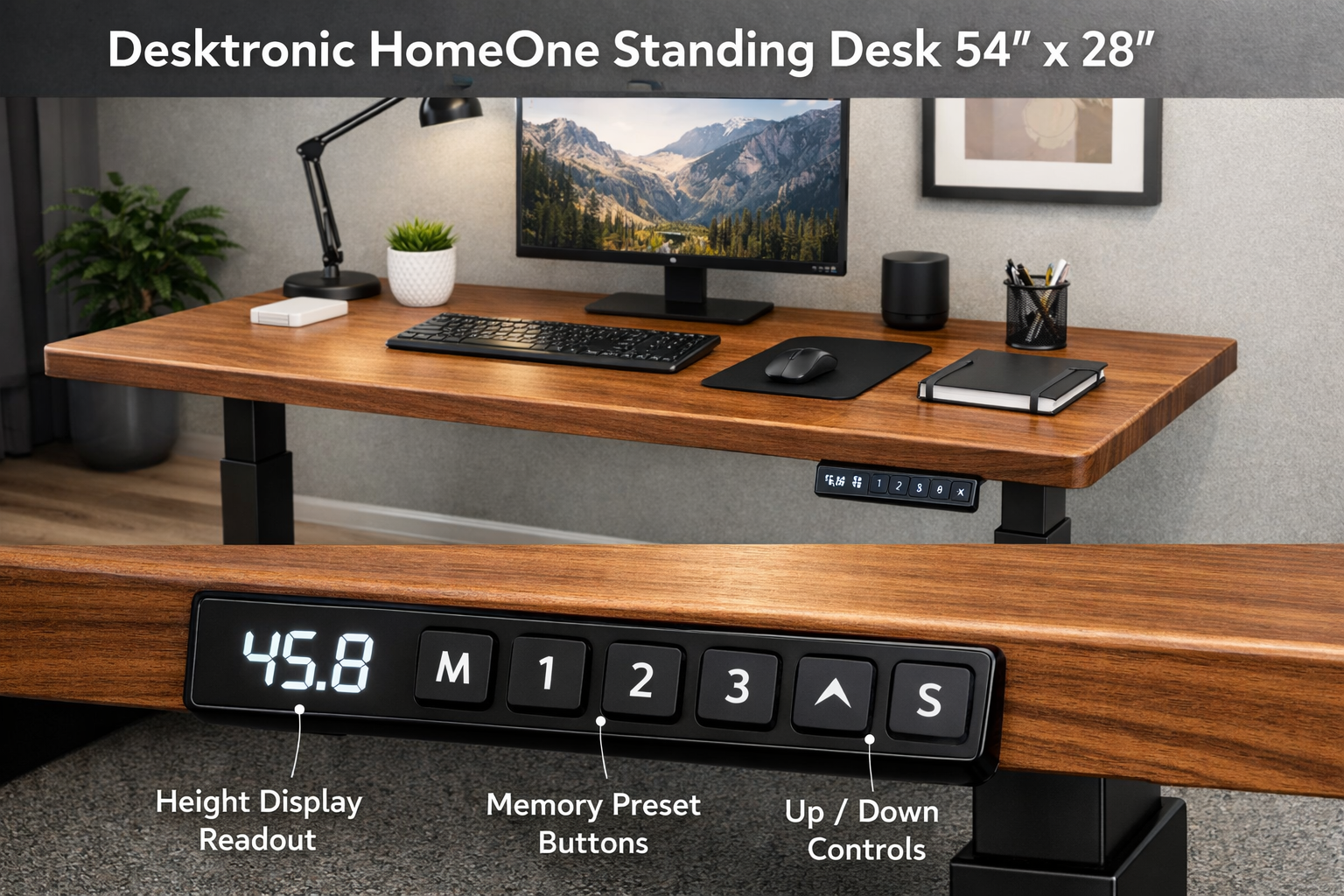
- The touchscreen control panel includes three memory presets, making it easy to switch between sitting and standing positions instantly.
- The wobble-free frame construction is one of its most frequently praised attributes, especially at standing height.
- Assembly is required, but the European manufacturing standards generally translate to tighter tolerances and better hardware quality.
- At this price, it competes with higher-end home office desks and is best suited for users who spend 6–10 hours daily at their workstation.
- The buying process on Amazon requires navigating to “See All Buying Options,” which is a minor friction point worth knowing before you shop.
Introduction: Why Your Desk Choice Actually Matters
🛒 Check Price on Amazon
Most people spend more time at their desk than in their car, yet they’ll research a car for months and buy a desk in ten minutes. That math doesn’t work in your favor, especially if you’re dealing with back pain, afternoon fatigue, or a setup that just doesn’t feel right after a few hours.
Standing desks have moved from office novelty to genuine health tool over the past decade. The idea is simple: alternating between sitting and standing throughout the workday reduces prolonged sedentary time, which is associated with a range of musculoskeletal complaints.
But not all standing desks are built the same. A wobbly frame at standing height is more than annoying, it undermines the entire point of the investment.
The Desktronic HomeOne Standing Desk enters this space with a clear pitch: European engineering, a dual-motor lift, and a thoughtfully designed control interface, all in a 54×28-inch footprint that fits most home office configurations.
This review breaks down exactly what you get, what works, what doesn’t, and whether the price is justified.
Product Overview: What Is the Desktronic HomeOne?
The Desktronic HomeOne is a 54-inch by 28-inch electric sit-stand desk designed for home office use. It’s made in Europe, a detail that matters because European manufacturing standards for furniture tend to prioritize material quality, hardware precision, and durability over cost-cutting.
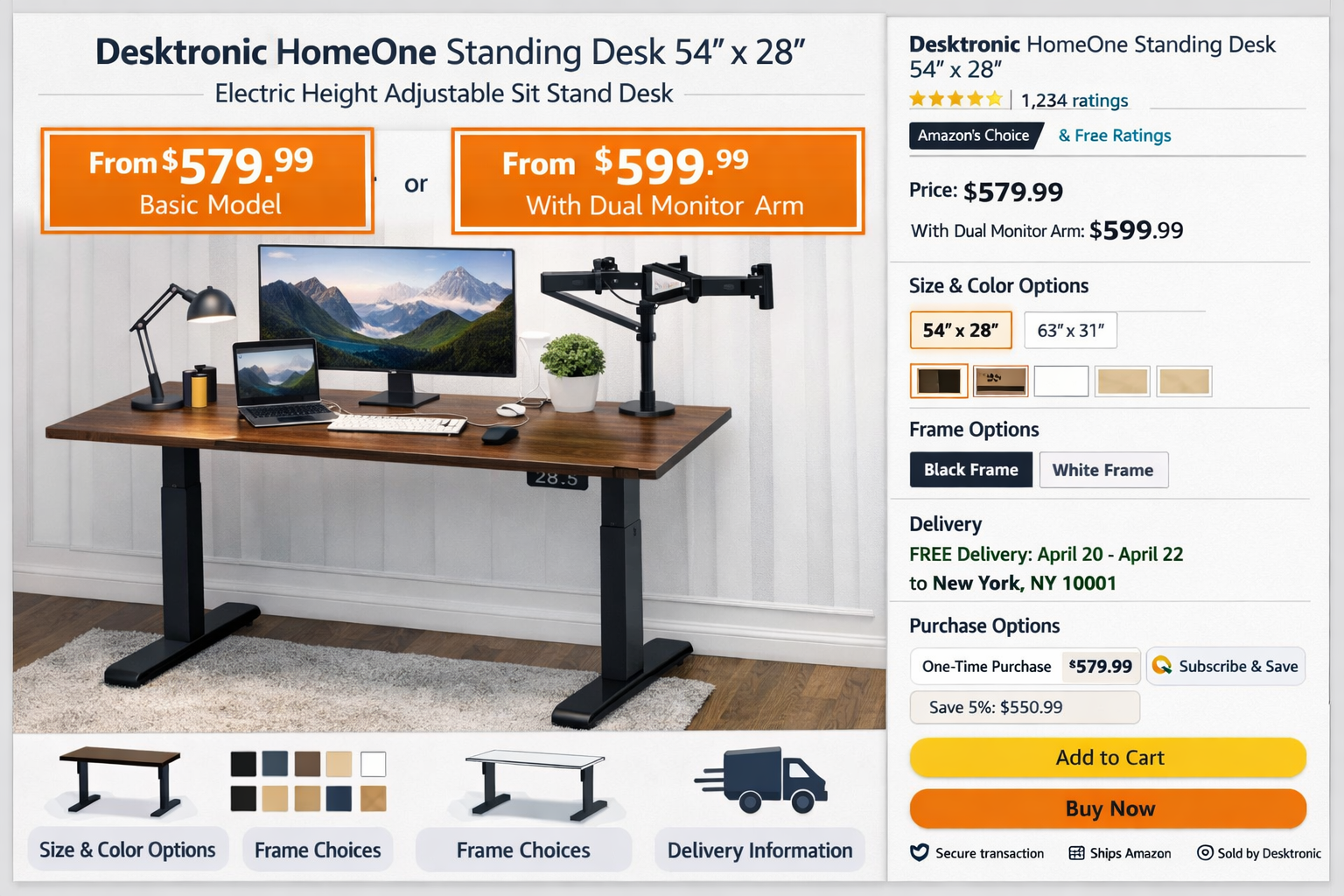
The desk is sold on Amazon in two configurations, priced at $579.99 and $599.99. The price difference between configurations is modest (roughly $20), and the variation likely reflects finish or color options rather than a meaningful feature difference. It’s worth checking both listings before purchasing.
The core problem this desk solves is straightforward: it lets you work comfortably at both sitting and standing heights without manual adjustment, guesswork, or the instability that plagues cheaper electric desks.
The dual-motor system, touchscreen panel, and memory presets are all designed to make the sit-stand habit as frictionless as possible.
Key Features: A Detailed Look at What You’re Paying For
Dual-Motor Electric Height Adjustment
The HomeOne uses two motors, one per leg, rather than a single central motor driving both columns. This matters for a 54-inch desk because a single motor has to work harder to keep both sides level during adjustment, which can cause slight tilting under load or accelerated wear over time.
With dual motors, each side lifts independently and in sync, producing smoother movement and more consistent leveling across the full width of the surface.
The adjustment is electric, meaning you press a button and the desk moves. There’s no manual cranking, no effort required. For users who switch positions multiple times a day, this is the difference between actually using the feature and ignoring it after the first week.
Touchscreen Control Panel with 3 Memory Presets
The control panel is a touchscreen rather than a traditional button array. It displays the current height numerically, which is useful for dialing in your exact ergonomic position. The three memory presets let you save your preferred sitting height, standing height, and a third position (useful for a stool or perch height if you use one).
In practice, this means your daily workflow looks like this: sit down, press preset 1 to confirm sitting height, work for 45–60 minutes, press preset 2, desk rises to standing height in a few seconds. No fumbling, no re-adjusting.
Desktronic HomeOne Standing Desk
Built-In USB and USB-C Charging Ports
This is a feature that sounds minor but genuinely improves day-to-day usability. Having USB and USB-C ports integrated into the desk surface means your phone, tablet, or wireless desk lamp can charge without occupying a wall outlet or requiring a separate hub sitting on the desk. It keeps the surface cleaner and reduces the number of cables running to the wall.
USB-C support is particularly relevant given that most modern laptops, phones, and accessories now use USB-C as their primary charging standard.
Wobble-Free Construction
At standing height, desk stability is the single biggest quality differentiator between budget and premium options. A desk that wobbles when you type is distracting and, over time, fatiguing.
The Desktronic HomeOnes frame is engineered specifically to minimize this. The dual-motor design contributes to this, but the frame construction itself, the crossbeam design, leg thickness, and hardware quality, also plays a significant role.
Based on the product’s specifications and European manufacturing standards, the frame is built to maintain rigidity across its full height range, not just at the lowest sitting position where any desk feels stable.
54×28-Inch Surface
The 54-inch width is a practical sweet spot for a home office. It’s wide enough for a dual-monitor setup or a large single monitor with room for a keyboard, mouse, and a notepad.
The 28-inch depth gives you enough front-to-back space to position your monitor at the correct viewing distance (typically 20–28 inches from your eyes) without pushing it against the wall.
Hands-On Experience: What Using This Desk Actually Feels Like
A standing desk’s quality becomes apparent in the details of daily use, not in the spec sheet.
The height adjustment on the HomeOne is quiet and smooth, the dual motors operate without the grinding or straining sound that single-motor desks sometimes produce under load. If you’re on a video call when you decide to switch positions, you won’t need to mute yourself while the desk moves.
The memory presets make the sit-stand habit genuinely sustainable. The biggest reason people stop using standing desks is friction: if adjusting height takes more than 10 seconds of active effort, most people stop doing it.
With preset buttons, switching takes about 3 seconds of button-pressing and 10–15 seconds of desk movement. That’s a realistic daily habit.
The built-in charging ports prove their value within the first week. Keeping a USB-C cable permanently routed through the desk grommet means your laptop or phone is always charging when you sit down, no hunting for cables, no occupied outlets.
The 54×28 surface handles a standard dual-monitor setup comfortably. With two 24-inch monitors on a monitor arm, there’s still room for a full-size keyboard, mouse, and a small notepad or coffee mug.
Users with ultrawide monitors (34 inches or larger) may find the 54-inch width tighter but still workable.
Pros and Cons
✅ What We Love
- Dual-motor system provides smooth, even lifting and better long-term durability than single-motor alternatives at this size.
- Wobble-free frame at standing height — this is the feature that separates functional standing desks from frustrating ones.
- Touchscreen with 3 memory presets makes switching positions fast enough to actually become a habit.
- Built-in USB and USB-C ports reduce cable clutter and add genuine daily convenience.
- European manufacturing generally means tighter tolerances, better hardware, and longer product lifespan.
- 54×28 surface is versatile enough for dual-monitor setups and standard home office configurations.
❌ What Could Be Better
- No featured offer on the main Amazon listing — buyers are directed to “See All Buying Options,” which adds a small but unnecessary friction step to the purchase process.
- Price variance between configurations ($579.99 vs. $599.99) isn’t clearly explained in the listing, making it slightly confusing to choose between them without additional research.
- Premium price point — at $579.99+, this desk costs significantly more than budget electric standing desks, which may put it out of reach for casual or first-time standing desk buyers.
- Assembly required — like most standing desks, this requires time and basic tools to set up. The European hardware quality makes this easier than average, but it’s still a 60–90 minute commitment.
🛒 Check Price on Amazon
Who Should Buy the Desktronic HomeOne?
The Desktronic HomeOne is the right desk for a specific type of buyer.
Buy this if you:
- Work from home 5+ days per week and spend 6–10 hours daily at your desk.
- Have experienced back, neck, or shoulder discomfort from prolonged sitting and want a desk you’ll actually use in standing mode.
- Value build quality and plan to keep this desk for 5+ years.
- Want a clean, feature-complete setup without buying separate accessories (charging hubs, cable management add-ons).
- Have a budget of $580–$600 and want to spend it on one well-made piece rather than multiple cheaper components.
Who Should Skip This?
The HomeOne is not the right choice for everyone, and being honest about that is more useful than overselling it.
Skip this if you:
- Are buying your first standing desk and aren’t sure you’ll use the standing feature consistently. Start with a more affordable option to test the habit before investing at this level.
- Need a desk larger than 54 inches. This specific model won’t accommodate triple-monitor setups or L-shaped configurations.
- Are on a tight budget. At $579.99, this is a considered purchase. If budget is the primary constraint, there are functional electric standing desks available at lower price points.
- Need the desk delivered and ready in 24 hours. Factor in shipping time and assembly before committing if you have a hard deadline.
How to Get the Best Deal
A few practical tips before you purchase:
- Check both configurations. The $579.99 and $599.99 listings may differ in finish or color. Decide which works for your space before clicking through, since the “See All Buying Options” step can be confusing.
- Use the affiliate link directly to reach the correct product page: 🛒 Check Price on Amazon. This saves you the search step and ensures you’re looking at the right listing.
- Check for coupons on the Amazon listing page. Amazon frequently offers clip-on coupons for furniture products that don’t appear in the headline price.
- Factor in assembly time. If you’re ordering for a specific start date (a new job, a home office renovation), order at least a week early to account for shipping and a 60–90 minute assembly window.
- Verify return policy before purchasing. Large furniture items sometimes have different return windows than standard Amazon products. Confirm the return terms at checkout.
FAQ
Q: What height range does the Desktronic HomeOne adjust to?
The exact height range isn’t specified in the available listing details. For most electric standing desks in this category, the range typically spans from approximately 28–29 inches (seated) to 47–48 inches (standing). Verify the specific range on the product listing before purchasing if you’re taller or shorter than average.
Q: How loud is the motor during height adjustment?
Dual-motor systems on quality standing desks generally operate at 45–50 decibels, comparable to a quiet conversation. The HomeOne’s dual-motor design is engineered for smooth, quiet operation, making it suitable for use during calls or in shared spaces.
Q: Does the desk come with a warranty?
Warranty details should be confirmed on the Amazon product page or directly with Desktronic. European-manufactured furniture products in this category typically carry at least a 2-year warranty on the motor and frame, but verify this before purchasing.
Q: Can the desk surface support dual monitors and a laptop simultaneously?
Yes. The 54×28-inch surface comfortably accommodates two 24-inch monitors (ideally on a monitor arm to free up surface space), a laptop, keyboard, and mouse. The desk’s weight capacity should be confirmed in the product specs, but dual-motor desks in this class typically support 150–200 lbs.
Q: Is assembly difficult?
Assembly is required but manageable for one person. The European hardware quality means components fit together with minimal gap or misalignment. Plan for 60–90 minutes and have a Phillips-head screwdriver and a rubber mallet available.
Q: What’s the difference between the $579.99 and $599.99 options?
Based on available information, the price difference likely reflects a finish or color variation rather than a feature difference. Check both listings on Amazon to see which configuration matches your workspace before purchasing.
Final Verdict
The Desktronic HomeOne Standing Desk is a genuinely well-made product for a specific buyer: the home office professional who works long hours, wants a sit-stand habit that actually sticks, and is willing to invest in quality hardware that lasts.
The dual-motor system, wobble free frame, touchscreen presets, and built-in USB/USB-C charging aren’t marketing checkboxes, they’re features that improve daily usability in concrete ways.
At $579.99–$599.99, it’s not a budget purchase. But for the buyer it’s designed for, it’s a reasonable investment in a workspace tool they’ll use every single day for years.
The minor friction in the Amazon buying process (the “See All Buying Options” step) is a small annoyance, not a dealbreaker.
If you’re ready to build a home office setup that supports your health and productivity without compromising on build quality, the Desktronic HomeOne deserves a serious look.