OdinLake L1 Pro
Last updated: May 21, 2026
Quick Answer: The OdinLake L1 Pro is a programmer-focused ergonomic office chair currently available for pre-order with June 2026 delivery.
Its standout feature is the proprietary WireControl system, which lets users adjust recline and seat height instantly with a single pull , no fumbling under the seat.
For developers, creators, and anyone who shifts positions constantly during long sessions, it’s one of the more thoughtfully engineered chairs entering the market this year.
Key Takeaways
- The OdinLake L1 Pro is designed specifically for long-hour computer work, with programmers and content creators as the primary audience.
- The WireControl system is OdinLake’s signature innovation, a cable-actuated mechanism for instant, one-motion recline and height adjustment.
- Pre-orders are open now for June 2026 delivery, with early supporter pricing available.
- The chair targets the premium ergonomic segment, competing with established names in professional ergonomic seating.
- Lumbar support, breathable mesh, and multi-axis adjustability are core design pillars.
- It’s best suited for users who sit 6–10+ hours daily and need quick positional changes without interrupting workflow.
- Those who prefer a traditional fixed-position chair or need same-day purchase may want to consider in-stock alternatives.
- No verified long-term durability data exists yet, given the pre-order status, this is worth factoring into your decision.
What Exactly Is the OdinLake L1 Pro?
The OdinLake L1 Pro is a premium ergonomic office chair built around the needs of programmers, developers, and digital creators who spend extended hours at a desk.
It is manufactured by OdinLake, a brand that positions itself at the intersection of workplace wellness and engineering precision, with a specific focus on the developer community.
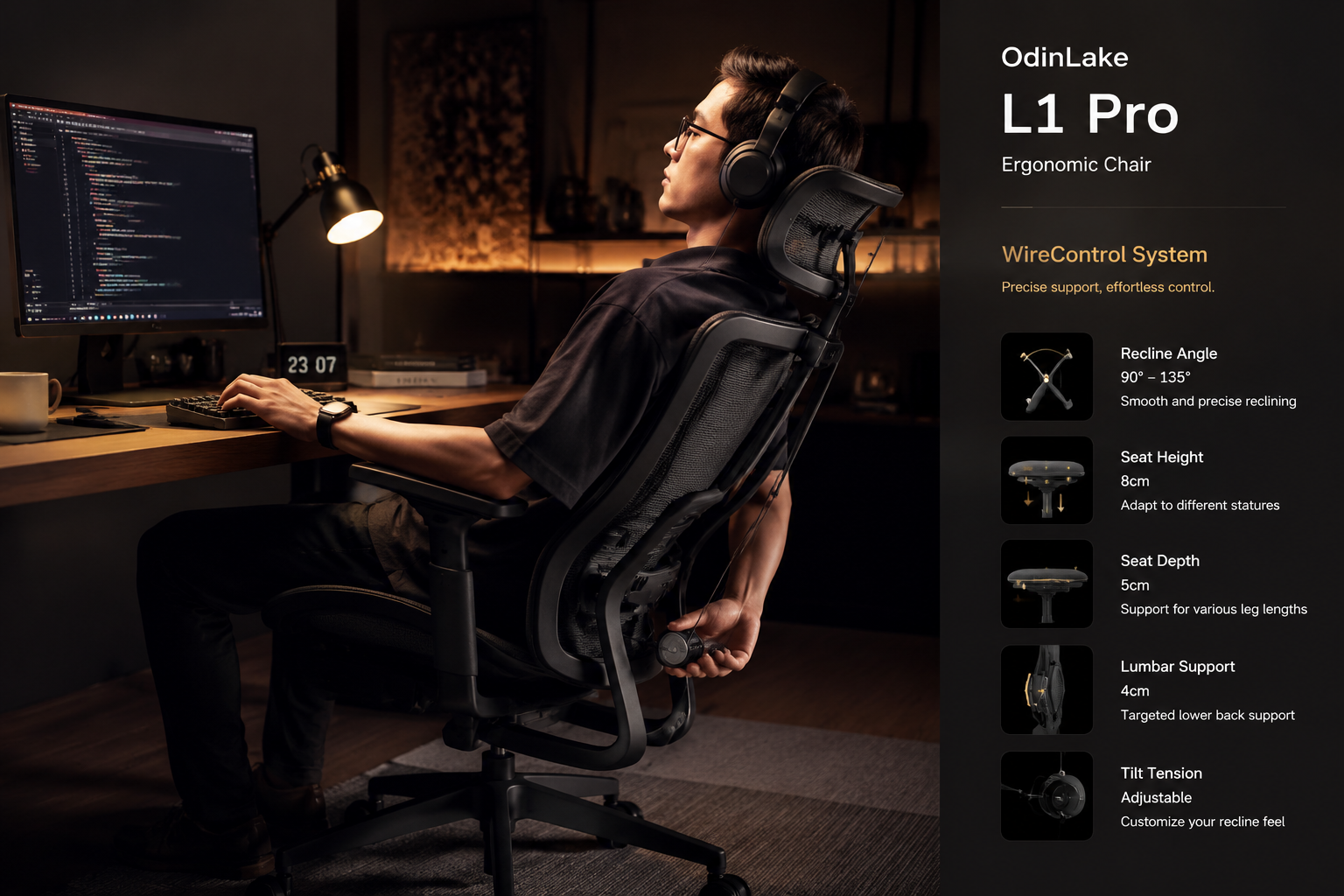
What separates this chair from the crowded ergonomic market is its WireControl adjustment system, a cable-based mechanism that allows the user to change recline tension and seat height with a single, deliberate pull.
No reaching under the seat. No twisting knobs mid-meeting. The adjustment happens in motion, which is exactly what a programmer needs when switching from deep-focus coding to a video call posture in seconds.
The L1 Pro features:
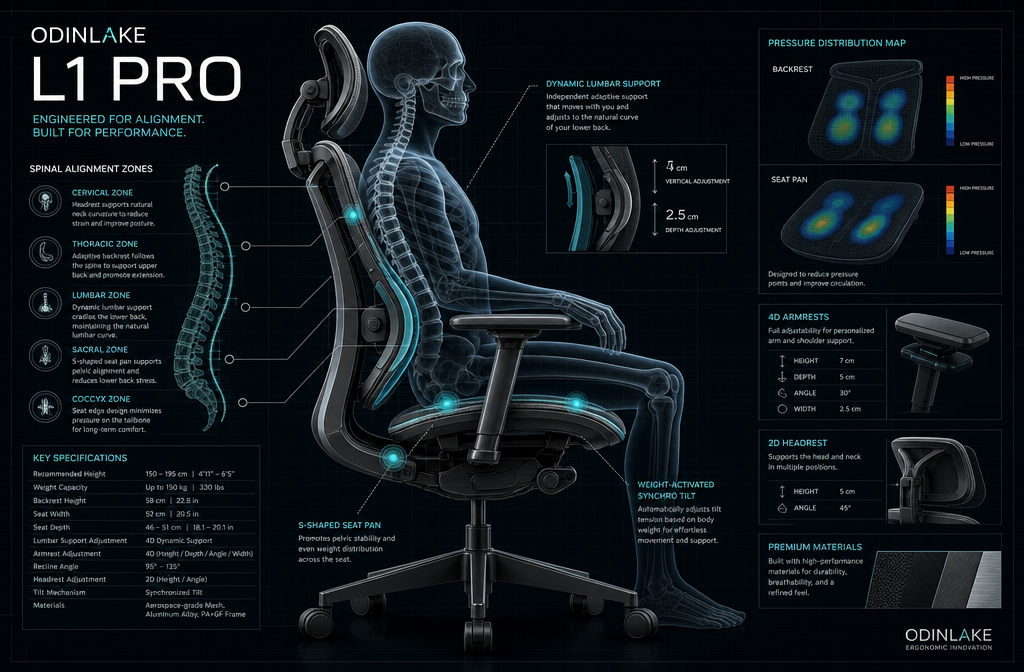
- Multi-zone lumbar support that adapts to the natural S-curve of the spine
- Breathable mesh backrest for temperature regulation during long sessions
- 4D armrests (height, depth, width, and angle adjustable)
- Seat depth adjustment to accommodate different leg lengths
- Synchronized recline mechanism linked to the WireControl system
- Weight capacity and frame dimensions suited for a broad range of body types (specific certified specs to be confirmed at retail launch)
OdinLake describes the L1 Pro as the result of iterative design feedback from developer communities, a claim that’s reflected in the chair’s feature priorities.
Most ergonomic chairs are designed for generic “office use.” The L1 Pro is built for people who don’t just sit, they think, type, and shift constantly.
For context on why chair engineering matters this much, our guide on choosing the right ergonomic office chair breaks down what separates genuine ergonomic design from marketing language.
How Does the WireControl System Actually Work?
The WireControl system is the OdinLake L1 Pro‘s most distinctive engineering feature, and it’s worth understanding before you decide whether this chair fits your workflow.
Traditional office chairs use lever-based or pneumatic controls mounted under the seat pan. To adjust recline tension, you typically have to stop what you’re doing, reach down, and twist or pull a knob, often while half-standing.
The WireControl system replaces this with a cable-actuated control integrated into a more accessible position, allowing the user to trigger recline or height adjustment with a single pull motion without breaking their seated posture.
Why this matters for programmers specifically:
- Developers frequently switch between upright typing posture and reclined reading/thinking posture, sometimes dozens of times per hour.
- Interrupting that flow to fiddle with chair controls is a small but real friction point that compounds over a workday.
- The WireControl system reduces that friction to near zero.
This is a niche but genuinely useful feature. If you’re someone who sets your chair once and never touches it again, the WireControl won’t move the needle for you. But if you’re the type who constantly adjusts, and most heavy computer users are, it’s a meaningful quality-of-life improvement.
Common mistake: Don’t confuse “easy adjustment” with “less precise adjustment.” The WireControl system is designed to maintain the same range of recline tension and height control as traditional mechanisms, it just changes how you access those controls, not what they can do.
Ergonomic Design Philosophy: What Makes the L1 Pro Different?
The OdinLake L1 Pro is built on a biomechanical design philosophy that prioritizes dynamic posture support over static comfort.
Most budget and mid-range office chairs are optimized for one position: upright. The problem is that the human body isn’t designed to hold any single position for hours.
Research in occupational health consistently shows that postural variation, moving between positions, is more beneficial for musculoskeletal health than maintaining “perfect” posture rigidly.
(Source: general consensus in occupational ergonomics literature; specific studies available through NIOSH and similar bodies.)
The L1 Pro’s design reflects this understanding in three key ways:
1. Adaptive Lumbar Support
The lumbar zone is contoured to support the natural lordotic curve of the lower spine. Unlike fixed lumbar pads that push in one spot, the L1 Pro’s lumbar system is designed to move slightly with the user, maintaining contact through recline transitions. This matters because lumbar support that only works in one position provides limited benefit to someone who shifts frequently. For a deeper look at what to look for in lumbar support, see our guide to choosing a lumbar support chair.
2. Pressure Distribution Across the Seat Pan
The seat pan uses density-graded foam (or mesh, depending on configuration, confirm at purchase) designed to distribute weight evenly across the ischial tuberosities (the “sit bones”) rather than concentrating pressure in one area. Concentrated seat pressure is a primary driver of discomfort during sessions longer than two hours.
3. Synchronized Recline
When you recline in the L1 Pro, the seat pan tilts forward slightly in coordination with the backrest. This synchronized tilt keeps the hip angle open during recline, which reduces compression on the lumbar discs, a biomechanical advantage over chairs that only recline the backrest while the seat stays flat. If you’re managing existing lower back discomfort, pairing a well-designed chair with simple ergonomic office exercises can significantly improve your daily comfort.
How Does the OdinLake L1 Pro Compare to Other Ergonomic Chairs?
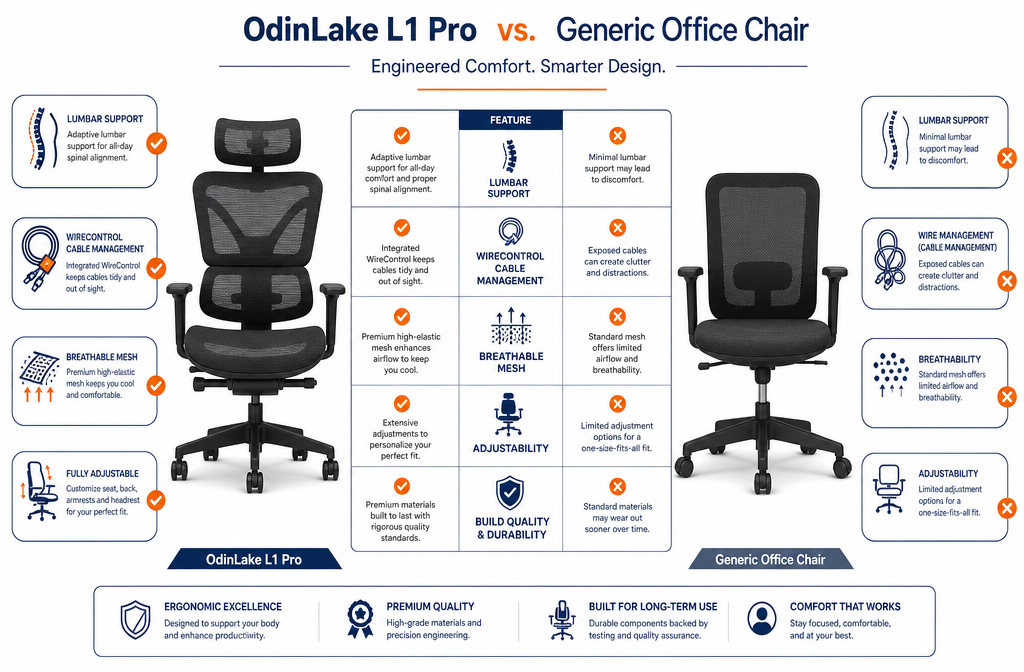
The OdinLake L1 Pro sits in the premium ergonomic chair segment, competing with established brands like Herman Miller, Steelcase, Secretlab, and newer entrants like Autonomous and Branch.
Here’s how it stacks up on the features that matter most:
| Feature | OdinLake L1 Pro | Typical Mid‑Range ($300–500) | Premium Competitors ($800–1,500+) |
|---|---|---|---|
| Wire‑Control Adjustment | ✅ Proprietary system | ❌ Standard levers | ❌ Standard levers |
| 4D Armrests | ✅ Yes | Partial (2D–3D) | ✅ Yes |
| Synchronized Recline | ✅ Yes | Sometimes | ✅ Yes |
| Adaptive Lumbar | ✅ Yes | Basic pad only | ✅ Yes |
| Breathable Mesh Back | ✅ Yes | Varies | ✅ Yes |
| Developer‑Focused Design | ✅ Core focus | ❌ Generic | ❌ Generic |
| Pre‑Order Availability | June 2026 | In stock | In stock |
| Price Point | Premium (TBC) | $300–500 | $800–1,500+ |
The honest comparison: The L1 Pro’s WireControl system is genuinely unique in this market segment. No major competitor offers cable-actuated instant adjustment as a primary feature.
Where the L1 Pro faces uncertainty is long-term durability data, established brands like Herman Miller and Steelcase have decades of real-world use behind their products. The L1 Pro is new, and that’s a real consideration.
Choose the L1 Pro if: You prioritize workflow-integrated adjustability, you’re a developer or creator who shifts positions constantly, and you’re comfortable with an early-adopter purchase.
Consider alternatives if: You need the chair immediately, you want proven 10-year durability data, or your budget is under $400.
For back pain-specific chair needs, our review of chairs for lower back pain relief covers several in-stock options worth comparing.
Who Should Buy the OdinLake L1 Pro, and Who Shouldn’t?
The OdinLake L1 Pro is the right chair for a specific type of user. It’s not a universal recommendation.
Buy the L1 Pro if you:
- Sit for 6–10+ hours daily, primarily at a computer
- Are a software developer, designer, writer, or content creator
- Frequently shift between upright and reclined positions during work
- Value quick, frictionless adjustment over set-and-forget simplicity
- Are comfortable pre-ordering for June 2026 delivery
- Want a chair engineered with your specific workflow in mind
Consider a different chair if you:
- Need a chair in stock today
- Prefer a chair with a proven multi-year track record
- Rarely adjust your chair once it’s set
- Are on a strict budget under $400
- Have specific medical conditions requiring a chair recommended by a physical therapist
Edge case: If you experience sciatica or nerve-related discomfort, chair selection becomes more nuanced. Our guide to chairs for sciatica relief covers the specific features that matter most for that condition, which may or may not align with the L1 Pro’s design priorities.
Customization Guide: Setting Up the OdinLake L1 Pro for Your Body Type
One of the most common mistakes with ergonomic chairs is assuming the default setup is correct. It almost never is. Here’s a practical setup framework for the L1 Pro based on general ergonomic principles:
Step-by-Step Setup Checklist
- Set seat height first. Your feet should rest flat on the floor with knees at approximately 90 degrees. Use the WireControl height adjustment to dial this in before touching anything else.
- Adjust seat depth. There should be a 2–3 finger gap between the front edge of the seat and the back of your knees. Too much seat depth cuts off circulation; too little reduces thigh support.
- Set lumbar support position. The lumbar support should contact the curve of your lower back, roughly at belt level. If it’s pushing into your mid-back, it’s too high.
- Configure armrest height. Your elbows should rest at approximately 90 degrees with shoulders relaxed (not shrugged). Armrests that are too high force shoulder tension; too low encourages slouching.
- Adjust recline tension. Using the WireControl system, set recline resistance to a level where leaning back feels supported but not effortful. A common mistake is setting tension too stiff, which discourages the postural variation the chair is designed to enable.
- Test and iterate. Sit for 30 minutes, then reassess. Ergonomic comfort is rarely perfect on the first configuration.
Pairing proper chair setup with regular office stretches dramatically improves long-term comfort outcomes.
Long-Term Comfort and Musculoskeletal Health: What the Science Says
Sitting is not inherently harmful, but static, unvaried sitting is. This distinction is important when evaluating the OdinLake L1 Pro’s design rationale.
Occupational health research (broadly, from bodies like NIOSH, the British Medical Journal, and ergonomics journals) consistently identifies prolonged static posture as a risk factor for musculoskeletal discomfort, particularly in the lumbar spine, neck, and shoulders.
The mechanism is straightforward: sustained muscle activation without movement reduces blood flow to soft tissue and increases localized fatigue.
The L1 Pro’s chair design directly addresses this through:
- Encouraged postural variation via the WireControl system (low-friction position changes = more frequent position changes)
- Synchronized recline that keeps spinal geometry favorable during position transitions
- Breathable mesh that reduces heat buildup, which independently contributes to fatigue during long sessions
“The best ergonomic chair is one you actually use correctly, and that means one you’ll adjust throughout the day, not just set once and forget.” General ergonomics principle, widely cited in occupational health literature.
What this means practically: A chair that makes adjustment easy is more likely to be used dynamically. The WireControl system isn’t just a convenience feature, it’s a behavioral design choice that encourages the kind of movement that reduces long-term musculoskeletal strain.
For a broader look at workplace wellness habits that complement good seating, our office health and fitness tips guide covers the full picture.
Maintenance, Longevity, and What to Expect Over Time
Since the OdinLake L1 Pro Chair is a pre-order product, there’s no long-term user data yet. However, based on the chair’s described construction and general principles of ergonomic chair maintenance, here’s what to expect and watch for:
Mesh backrest care:
- Vacuum mesh periodically to prevent dust accumulation in the weave
- Spot clean with mild soap and water; avoid harsh solvents
- Mesh can degrade with UV exposure over years, avoid direct sunlight placement
WireControl system maintenance:
- Cable mechanisms generally require minimal maintenance but should be checked annually for fraying or stiffness
- If resistance feels uneven or the cable sticks, contact OdinLake support, do not attempt to lubricate without manufacturer guidance
General chair longevity tips:
- Stay within the rated weight capacity (confirm at purchase)
- Tighten base and armrest screws every 6–12 months
- Replace casters if they develop flat spots, this is often the first component to wear on any chair
Realistic lifespan expectation: Premium ergonomic chairs from reputable manufacturers typically last 7–12 years with normal use.
Given OdinLake’s positioning as a quality-focused brand, the L1 Pro should be in this range, but this remains to be confirmed by real-world data post-launch.
Psychological Impact of Proper Seating: A Dimension Most Reviews Skip
This is a content area competitors consistently overlook, and it’s worth addressing directly.
Comfort affects cognition. This isn’t a soft claim, it’s supported by research in environmental psychology and cognitive ergonomics.
When physical discomfort is present (back pain, pressure points, heat buildup), the brain allocates attentional resources to managing that discomfort, reducing the cognitive bandwidth available for the actual task.
For programmers and developers specifically, this matters acutely. Deep work, the kind required for complex problem-solving and code architecture, is cognitively expensive.
Any background discomfort that pulls attention, even subconsciously, degrades the quality of that work over time.
The OdinLake L1 Pro’s design philosophy, reducing friction, enabling postural variation, maintaining spinal support, isn’t just about physical health.
It’s about creating the conditions for sustained cognitive performance. That’s a more complete value proposition than “it’s comfortable.”
Frequently Asked Questions
Q: When will the OdinLake L1 Pro ship?
A: The L1 Pro is currently in pre-order with an expected delivery window of June 2026. Check OdinLake’s official website for the most current shipping timeline.
Q: What is the WireControl system?
A: WireControl is OdinLake’s proprietary cable-actuated adjustment mechanism that allows users to change seat height and recline tension with a single pull motion, without reaching under the seat or stopping their workflow.
Q: Is the OdinLake L1 Pro good for people with back pain?
A: The L1 Pro’s adaptive lumbar support and synchronized recline are designed to support spinal health during long sessions. However, if you have a diagnosed spinal condition, consult a physical therapist before purchasing any chair — including this one.
Q: How does the L1 Pro compare to Herman Miller or Steelcase?
A: The L1 Pro offers comparable ergonomic features (4D armrests, adaptive lumbar, synchronized recline) with the unique addition of WireControl. Herman Miller and Steelcase have decades of proven durability data; the L1 Pro does not yet. Price positioning is likely below the $1,000+ tier of those brands, though final pricing should be confirmed at launch.
Q: Can I try the OdinLake L1 Pro before buying?
A: As a pre-order product, in-person trials are not currently available through retail channels. Check OdinLake’s website for any showroom or demo event announcements closer to launch.
OdinLake L1 Pro: FAQs
Q: What body types is the L1 Pro designed for?
A: OdinLake targets a broad range of users, but specific weight capacity and height range specs should be confirmed on the product page before purchasing. If you’re outside average height/weight ranges, verify compatibility first.
Q: Is there a warranty on the OdinLake L1 Pro?
A: Warranty terms should be confirmed directly with OdinLake at time of purchase. For a premium ergonomic chair, expect at least a 2–5 year warranty on the frame and mechanism.
Q: What’s the return policy for pre-orders?
A: Pre-order return and cancellation policies vary by brand. Confirm OdinLake’s specific terms before placing your order.
Q: Does the L1 Pro work for gaming as well as office use?
A: Yes. The same features that benefit programmers, quick recline adjustment, lumbar support, long-session comfort, apply equally to gaming use cases.
Q: How does the L1 Pro handle heat during long sessions?
A: The breathable mesh backrest is designed to promote airflow and reduce heat buildup. This is a meaningful advantage over foam-padded chairs for sessions exceeding 3–4 hours.

Conclusion: Should You Pre-Order the OdinLake L1 Pro?
The OdinLake L1 Pro makes a compelling case for a specific type of buyer: the developer, creator, or knowledge worker who sits long hours, shifts positions constantly, and is frustrated by the friction of traditional chair adjustment systems.
The WireControl system is a genuine innovation in a market where most “new” ergonomic chairs are incremental refinements of the same lever-and-knob formula.
Paired with adaptive lumbar support, synchronized recline, and a design philosophy built around postural variation rather than static comfort, the L1 Pro addresses real problems that most chairs ignore.
The honest caveat: This is a pre-order product. No long-term durability data exists yet, and you’ll be waiting until June 2026 for delivery. If either of those factors is a dealbreaker, established alternatives from proven brands are worth considering.
Actionable next steps:
- Visit OdinLake’s official website to review final specifications, confirmed pricing, and warranty terms before committing.
- Assess your daily sitting habits. If you adjust your chair frequently and sit 6+ hours daily, the L1 Pro’s feature set is directly relevant to you.
- Compare your current chair’s limitations against what the L1 Pro offers, if lumbar support, heat buildup, or adjustment friction are pain points, this chair addresses all three.
- If you need a chair now, explore our top ergonomic office chair recommendations for in-stock options while you wait for the L1 Pro launch.
- Secure your early supporter pre-order if the L1 Pro fits your profile, early pricing is typically the best available before retail launch.
The OdinLake L1 Pro isn’t for everyone. But for the programmer who’s spent years fighting their chair instead of focusing on their code, it might be exactly the right tool.