Newtral Magic H BP Ergonomic Office Chair with Laptop Table
Lastest Update: May 21, 2026
Quick Answer: The Newtral Magic H BP Ergonomic Office Chair is a well-engineered, highly adjustable mesh chair built specifically for people who sit long hours and struggle with lower-back discomfort.
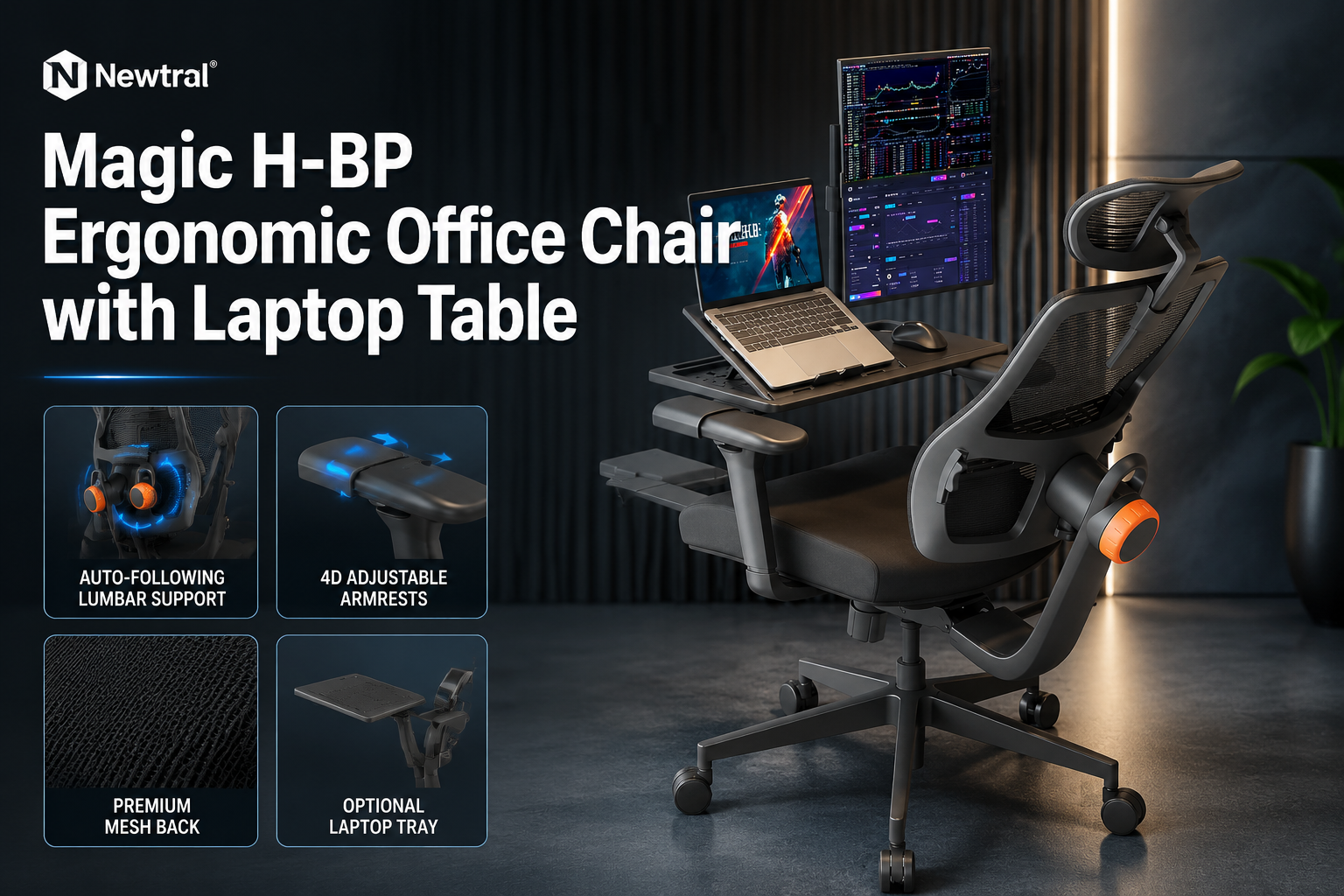
Its standout feature, an auto-following lumbar support that moves with your body, sets it apart from most chairs in its category.
If you want a chair that adapts to you rather than forcing you to adapt to it, this one deserves serious consideration.
Key Takeaways
- The auto-following lumbar support tracks your spine as you recline, maintaining contact without manual readjustment
- 4D armrests move in four directions (up/down, forward/back, side-to-side, and rotation), which is uncommon at this price tier
- Seat depth is adjustable, which matters for shorter and taller users alike, it directly reduces pressure behind the knees
- The chair is available in multiple configurations: base model, with footrest, with laptop tray, or both
- Mesh construction keeps airflow consistent during long sessions, avoiding the heat buildup common with foam-padded chairs
- Protection plans are available through Amazon but add to the overall cost
- Pricing varies by model variant; always Check the Official Newtral Site or the Amazon listing for current figures
- Best suited for remote workers, students, and office professionals who prioritize spinal support over plush cushioning
- Not ideal for users who prefer a heavily padded executive-style chair or need commercial-grade durability
Newtral Coupon Code Use – PETERMANN – 15% OFF
What Is the Newtral Ergonomic Office Chair and Who Makes It?
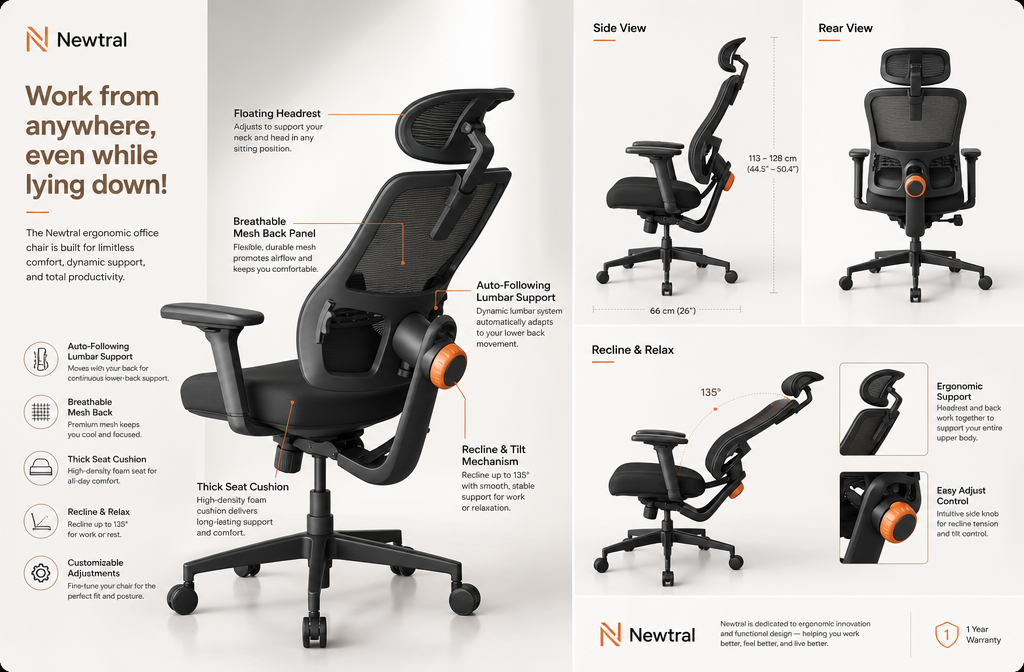
The Newtral Ergonomic Office Chair is a purpose-built seating solution from Newtral, a brand focused on ergonomic workspace products. The chair is designed to address one of the most common complaints among desk workers: lower-back pain caused by prolonged, static sitting.
Rather than relying on a fixed lumbar pad that users must position once and forget, Newtral engineered a lumbar system that follows the user’s posture dynamically.
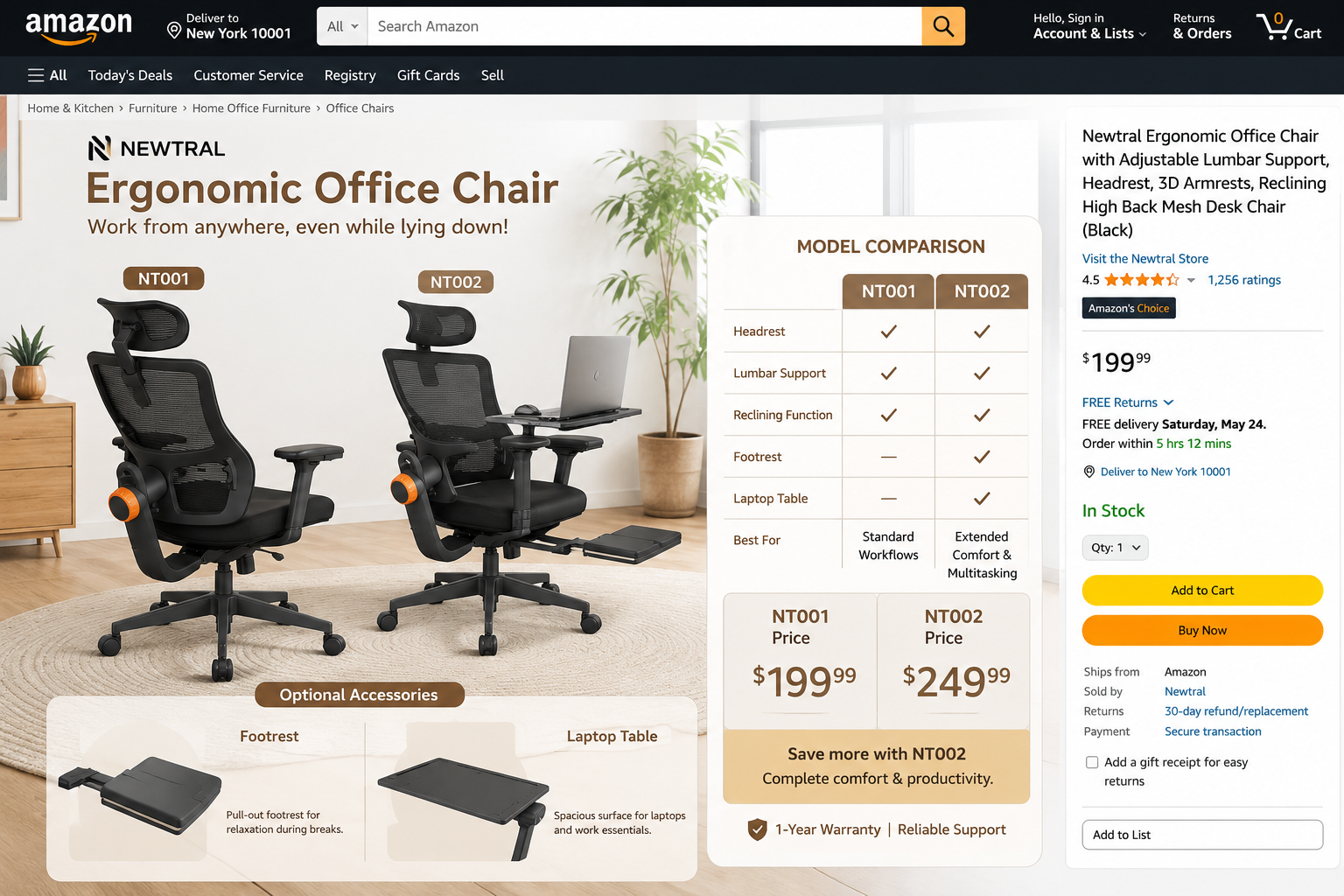
The chair comes in at least two primary model variants, the NT001 and NT002, with optional add-ons including a footrest and a laptop tray.
This modularity means buyers can configure the chair to match their specific workspace needs rather than paying for features they won’t use.
For anyone building or refining a home office setup, that kind of flexibility is genuinely useful.
If you’re already researching seating options and want broader context before committing, the Office Chair Outlet is a solid starting point for comparing categories and use cases.
How Does the Auto-Following Lumbar Support Actually Work?
The auto-following lumbar support is the Newtral chair’s most distinctive engineering feature, and it works by coupling the lumbar pad’s movement to the recline mechanism.
When you lean back, the lumbar support moves with your spine rather than staying fixed at one height. This means the pad maintains contact with your lower back throughout the full range of recline, something a static lumbar pad cannot do.
Why does this matter? When you recline in a chair with a fixed lumbar pad, your torso shifts upward relative to the pad, and the support point effectively drops to your mid-back or disappears entirely.
The Newtral design eliminates that gap. For users with chronic lower-back tension or mild disc issues, this continuous contact can meaningfully reduce fatigue over a six-to-eight-hour workday.
The back height is also adjustable independently, which allows users of different torso lengths to align the lumbar pad with their L4-L5 region, the area most commonly associated with desk-related back pain.
This is a feature worth paying attention to, especially if you’ve tried chairs where the lumbar support always seemed to hit the wrong spot. For more guidance on choosing a lumbar support chair that fits your specific back profile, that resource covers the key criteria well.
What Does “4D Armrest” Mean, and Why Does It Matter?
A 4D armrest adjusts along four axes: height (up/down), depth (forward/back), width (side-to-side), and rotation. Most budget and mid-range chairs offer only 2D armrests (height and sometimes width).
Some step up to 3D by adding rotation. The Newtral chair includes all four adjustments, which is meaningfully better for shoulder and wrist alignment.
Here’s why each dimension matters in practice:
- Height: Keeps your elbows at roughly 90 degrees, reducing shoulder elevation and trapezius tension
- Depth (forward/back): Lets you position the armrest under your forearm whether you’re typing, mousing, or reading
- Width (side-to-side): Narrows or widens the armrests to match your shoulder width, which is especially important for narrower users who feel standard armrests push their arms outward
- Rotation: Angles the pad inward for typing or outward for relaxed resting, a small adjustment that makes a noticeable difference during extended keyboard sessions
The 2D headrest adds height and angle adjustment. It won’t suit everyone, some users prefer no headrest at all, but for those who recline frequently or work in a more relaxed posture, having a headrest that can tilt to meet your neck rather than forcing your neck to meet it is a genuine ergonomic improvement.
How Does Adjustable Seat Depth Improve Comfort?
Seat depth adjustment is one of the most underappreciated ergonomic features in office chairs, and the Newtral includes it. The seat pan slides forward or backward to change the effective depth, which controls how much of your thigh is supported and how much pressure lands behind your knees.
If the seat is too deep for your leg length, the front edge of the seat presses into the back of your knees, restricting circulation and causing discomfort within an hour or two.
If it’s too shallow, your thighs lack support and your weight concentrates at your hips. The correct depth leaves roughly two to three fingers of space between the seat edge and the back of your knee.
For shorter users, this feature is especially important, many standard chairs are sized for average-to-tall users, making seat depth adjustment the difference between a comfortable chair and an unusable one.
If you’re shopping specifically for fit, the resources on chairs for shorter office workers and chairs for taller office workers break down what to look for by body type.
What Are the Footrest and Laptop Tray Options Like?
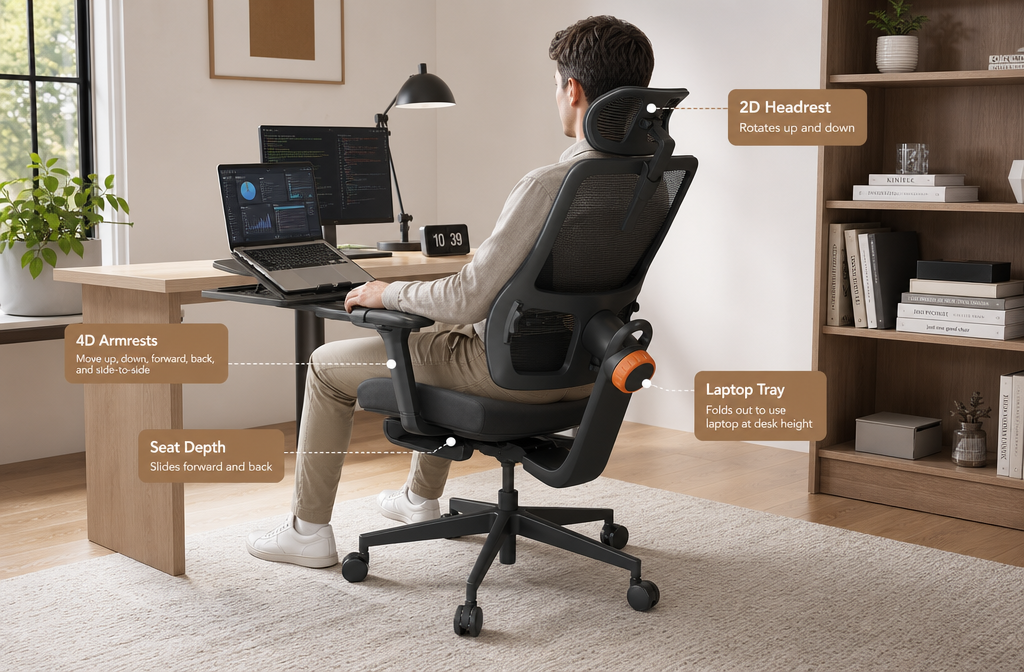
The Newtral chair offers two notable add-on configurations: an integrated footrest and a laptop tray. These are sold as part of specific model variants rather than universal accessories, so it’s worth confirming which version you’re ordering before purchase.
Footrest: The retractable footrest extends from beneath the seat and is designed for users who prefer a semi-reclined working posture or who want to elevate their legs during breaks.
It’s particularly useful for shorter users whose feet don’t reach the floor comfortably at standard desk height, or for anyone who wants to shift between active sitting and a more relaxed position throughout the day.
Laptop tray: This is the feature that makes the chair genuinely versatile as a standalone workstation. The tray attaches to the chair’s arm structure and swings into position over your lap, allowing you to work without a desk entirely, or to use a secondary device while seated away from your primary desk.
For remote workers who move between rooms, or for users in smaller living spaces, this is a practical addition rather than a gimmick.
Neither add-on dramatically changes the chair’s core ergonomic profile, but they expand its use cases in ways that justify the additional cost for the right user.
Hands-On Experience: What It’s Actually Like to Use This Chair
Sitting in the Newtral for the first time, the most immediate impression is how much the lumbar support does without requiring you to think about it.
In chairs with manual lumbar adjustment, there’s usually a setup phase where you fiddle with the knob until the support feels right, and then you avoid reclining too far because you know the support will lose contact. With the Newtral, that mental overhead disappears. You recline, and the support follows.
The mesh back is firm enough to provide structure without feeling rigid. During longer sessions, airflow through the mesh prevents the gradual warmth buildup that foam-backed chairs produce, which becomes noticeably more comfortable in warmer environments or during summer months.
The 4D armrests take a few minutes to dial in, but once set, they hold position reliably. The side-to-side adjustment in particular is something most users haven’t experienced before, being able to bring the armrests closer together for narrow-shoulder users, or wider apart for broader users, makes the chair feel genuinely fitted rather than generic.
Assembly is straightforward and typically takes 20 to 30 minutes with the included hardware. The instructions are clear, and the chair feels structurally solid once assembled, no wobble in the base, no flex in the backrest that suggests weak joints.
For anyone dealing with persistent lower-back discomfort at their desk, this chair addresses the problem at the source rather than masking it with padding.
That’s a meaningful distinction. For related context on chairs to ease lower back pain, that guide covers what features to prioritize based on the type of back issue involved.
Pros and Cons
✅ What We Love
- Auto-following lumbar support maintains contact throughout the recline range without manual adjustment
- 4D armrests offer a level of customization that most chairs in this category don’t provide
- Adjustable seat depth accommodates a wide range of leg lengths and body types
- Mesh back keeps air circulating during long sessions, reducing heat discomfort
- Modular configurations (base, with footrest, with laptop tray, or both) let buyers pay for what they actually need
- 2D headrest adds neck support for users who recline or work in a more relaxed posture
- Protection plans available through Amazon for buyers who want coverage against accidental damage or mechanical breakdown
❌ What Could Be Better
- Pricing varies significantly between model variants, and the cost of add-ons can push the total higher than expected, always verify current pricing before budgeting
- Protection plans are an additional cost and the Complete Protect plan excludes commercial use, which limits its value for business buyers
- Not ideal for plush-seating preferences, the mesh and structured design prioritizes support over softness, which won’t suit everyone
- Laptop tray and footrest are model-specific, meaning you can’t easily add them after purchase if you start with the base model
Who Should Buy the Newtral Ergonomic Office Chair?
This chair is best suited for remote workers, office professionals, and students who spend six or more hours per day at a desk and have experienced lower-back discomfort as a result.
The auto-following lumbar support is the core reason to choose it, and it delivers most of its value to users who recline frequently or shift posture throughout the day.
It’s also a strong choice for users who have struggled to find a chair that fits their body, particularly those who are shorter than average (thanks to seat depth adjustment and footrest option) or who need precise armrest positioning to avoid shoulder or wrist strain.
If you’re prone to sciatica or hip discomfort, the combination of adjustable seat depth and lumbar tracking addresses two of the primary contributors to those issues in seated positions.
For more targeted guidance, chairs for sciatica relief covers what to look for in that specific context.
Who Should Skip This Chair?
Skip the Newtral if you strongly prefer a heavily cushioned, executive-style chair with a leather or faux-leather finish.
This chair is built around mesh and structured support, it’s not designed to feel plush, and no amount of adjustment will change that fundamental character.
Also skip it if you need a chair for commercial or high-turnover use (multiple users per day, shift-based environments).
The protection plan’s exclusion of commercial use means you’d be without coverage in that scenario, and the chair’s design is optimized for single-user ergonomic customization rather than durability under heavy rotational use.
Finally, if your budget is fixed and the model variant with the features you need exceeds it, don’t compromise by buying the base model and expecting to add accessories later, the modular options are built into specific configurations, not universally retrofittable.
How to Get the Best Deal on the Newtral Chair
Newtral Coupon Code Use – PETERMANN – 15% OFF
Current pricing is available on the Official Newtral Website and on the Amazon product listing. Because pricing varies by model variant and region, checking both sources before purchasing is worth the extra two minutes, occasional promotional pricing appears on one platform but not the other.
A few practical tips:
- Decide on add-ons before ordering. The footrest and laptop tray are part of specific configurations. Know which variant you want before adding to cart.
- Check Amazon protection plan terms carefully. The Complete Protect plan covers multiple eligible purchases but excludes commercial use. If you’re buying for a home office, it’s worth considering. If you’re buying for a business, read the exclusions.
- Watch for seasonal sales. Black Friday and mid-year sales periods often include ergonomic chairs. If your timeline is flexible, Black Friday office chair deals can offer meaningful savings on chairs in this category.
- Verify your model number. The NT001 and NT002 differ in features and price. Confirm which model corresponds to the configuration you want before completing the purchase.
Frequently Asked Questions
Does the auto-following lumbar support work for all body types?
The lumbar support system is designed to follow the spine’s movement during recline, and the back height is independently adjustable to align with different torso lengths. Most users between roughly 5’2″ and 6’2″ should be able to position it correctly, but very tall or very short users should verify the adjustment range against their measurements before purchasing.
Can I add the footrest or laptop tray to the base model after purchase?
Generally, no. The footrest and laptop tray are integrated into specific model configurations rather than sold as universal aftermarket accessories. Choose the configuration you want at the time of purchase.
Is the mesh back durable over time?
Mesh backs in quality ergonomic chairs typically hold their tension and shape for several years under normal single-user conditions. The Newtral’s mesh is structured to maintain support rather than sag, but like any mesh chair, it will show wear faster under heavier use or in high-temperature environments.
Newtral Magic H BP Ergonomic Office Chair with Laptop Table: FAQs
What is the weight capacity of the Newtral chair?
Weight capacity varies by model variant. Check the specific product listing for the model you’re considering, as this specification can differ between the NT001 and NT002.
Is the chair difficult to assemble?
Assembly is straightforward for most users and typically takes 20 to 30 minutes. The hardware and instructions are included, and no specialized tools are required beyond what’s in the box.
Does the laptop tray work with all laptop sizes?
The tray is designed to accommodate standard laptop sizes, but very large laptops (17-inch models with wide chassis) may fit less comfortably. If you use a larger device, verify the tray dimensions against your laptop’s footprint before ordering.
Is this chair suitable for people with sciatica?
The adjustable seat depth and auto-following lumbar support address two common contributors to sciatic nerve irritation in seated positions. It’s a reasonable choice for users with mild to moderate sciatica, but anyone with a diagnosed spinal condition should consult a healthcare provider before relying on any chair as a therapeutic solution.
Final Verdict
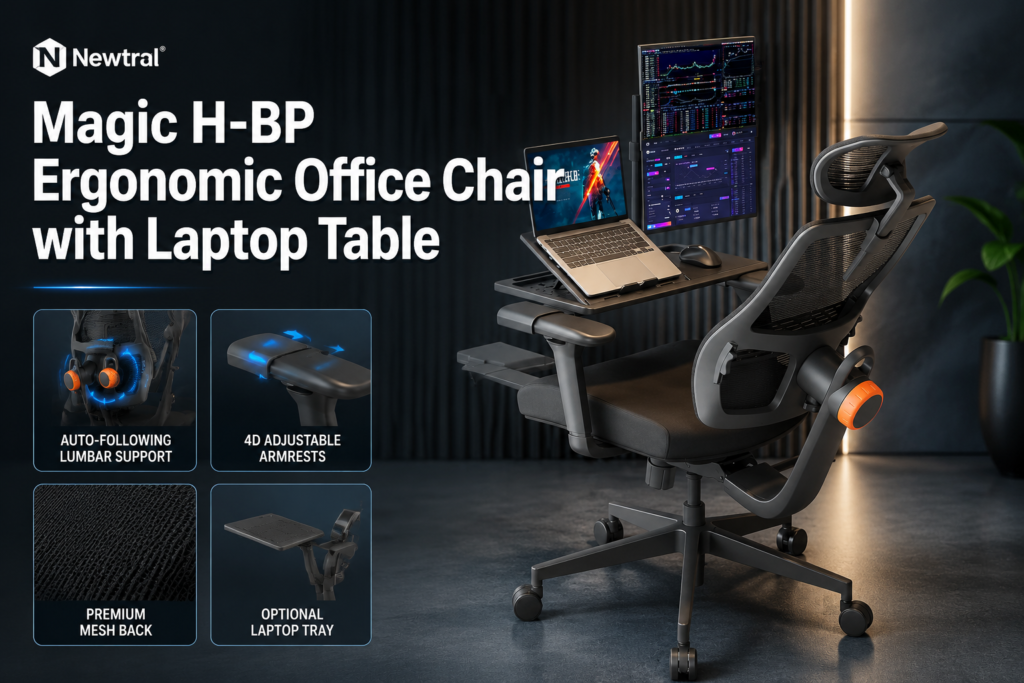
The Newtral Magic H BP Ergonomic Office Chair with Laptop Table earns its place as a serious option for anyone who sits long hours and wants a chair that actively supports their posture rather than passively accommodating it.
The auto-following lumbar support is not a marketing claim, it’s a mechanical feature that solves a real problem, and it works.
Combined with 4D armrests, adjustable seat depth, and a breathable mesh back, this chair covers the ergonomic fundamentals more thoroughly than most chairs at comparable price points.
The modular configuration options (footrest, laptop tray) add practical value without forcing every buyer to pay for features they don’t need.
The pricing variability between models is the main friction point, but it’s manageable with a few minutes of research before purchasing.
If you’re dealing with lower-back discomfort, struggling to find a chair that fits your body, or simply want a well-engineered seat that holds up through a full workday, the Newtral is worth the investment.
🛒 Check Latest Price
Newtral Coupon Code Use – PETERMANN – 15% OFF
Related Reading:
- Choosing a breathable mesh chair
- Back-friendly office chair options
- Chairs that support better posture
- Comfortable ergonomic office chairs explained