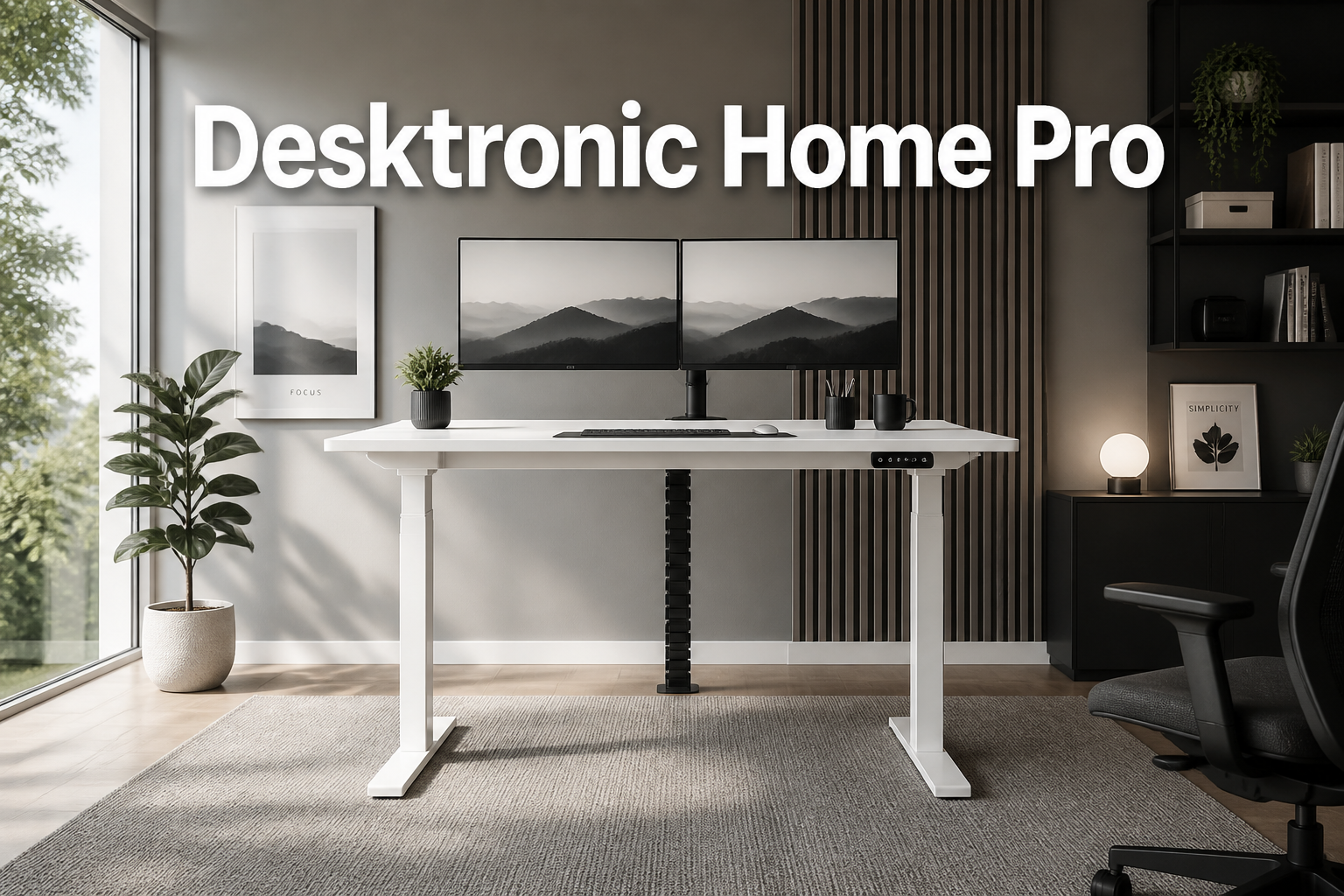
Desktronic Home Pro
Last updated: May 4, 2026
Quick Answer: The Desktronic Home Pro is a dual-motor electric height-adjustable standing desk made in Europe, designed for home office users who want a stable, quiet, and feature-rich sit-stand workstation.
It offers a height range of 61–128 cm, a 160 kg lifting capacity, built-in USB and USB-C charging ports, a touchscreen controller with three memory presets, and a wobble-free frame, all at a starting price of $539 (US) or £329 (UK).
Key Takeaways
- Height range: 61–125.5 cm (up to 128 cm with tabletop), suitable for users of most heights
- Dual motor system lifts at 50 mm/s with near-silent operation below 39 dB
- 160 kg (352 lbs) lifting capacity supports heavy dual-monitor setups and accessories
- Three memory presets via touchscreen let you switch between sitting and standing positions instantly
- Built-in USB-A and USB-C ports reduce cable clutter directly at the desk surface
- Anti-collision protection and soft start/stop prevent damage during height adjustments
- Motor rated for 20,000+ cycles, making it a long-term investment
- Available in three colors — Black (RAL9005), White (RAL9016), Grey (RAL9006) — with desk sizes from 48×24 to 80×30 inches
- Made in Europe, which means tighter quality control compared to many budget competitors
- Priced from $539 / £329, with the UK version currently discounted from £499
👉 Check current pricing and availability on Amazon
What Exactly Is the Desktronic Home Pro?
The Desktronic Home Pro is a premium electric sit-stand desk built specifically for home office environments. It combines a dual-motor frame, a pre-drilled office-grade tabletop, and smart features like a touchscreen controller and integrated charging ports into a single package.
Unlike many standing desks assembled from generic components, the Desktronic Home Pro is manufactured in Europe, which translates to stricter build tolerances and more consistent quality.
It’s designed for people who work from home and want a desk that handles daily use without wobbling, grinding, or requiring constant recalibration.
If you’re comparing this to budget options under $300, the difference shows up in the details: the noise level, the stability at standing height, and the durability over years of use.
Who Is the Desktronic Home Pro Best For?
The Desktronic Home Pro suits remote workers, freelancers, and home office professionals who spend six or more hours at a desk daily and want to reduce the physical strain that comes with prolonged sitting.
Choose this desk if you:
- Work from home full-time and want a long-term ergonomic investment
- Run a dual-monitor setup or have a heavy workstation (up to 160 kg capacity)
- Value quiet operation, under 39 dB means it won’t disrupt calls or household members
- Want integrated USB charging without adding a separate hub
- Prefer a desk with proven European manufacturing standards
It may not be the right fit if you:
- Need a desk under $400 and are willing to accept more limited features
- Work in a shared office where a frame-only purchase makes more sense
- Require a very large surface above 80×30 inches
Desktronic Home Pro Technical Specifications at a Glance
| Feature | Specification |
|---|---|
| Height Range | 61–125.5 cm (63.5–128 cm with 2.5 cm tabletop) |
| Lifting Speed | 50 mm/s |
| Lifting Capacity | 160 kg (352 lbs) |
| Noise Level | Below 39 dB |
| Motor Cycles | 20,000+ rated cycles |
| Memory Presets | 3 (via touchscreen) |
| Charging Ports | USB-A + USB-C |
| Column Design | 3-stage |
| Available Colors | Black, White, Grey |
| Desk Size Range | 48×24 in to 80×30 in |
| Price (US) | From $539 |
| Price (UK) | From £329 (regular £499) |
| Origin | Made in Europe |
What Are the Ergonomic Benefits of the Desktronic Home Pro?
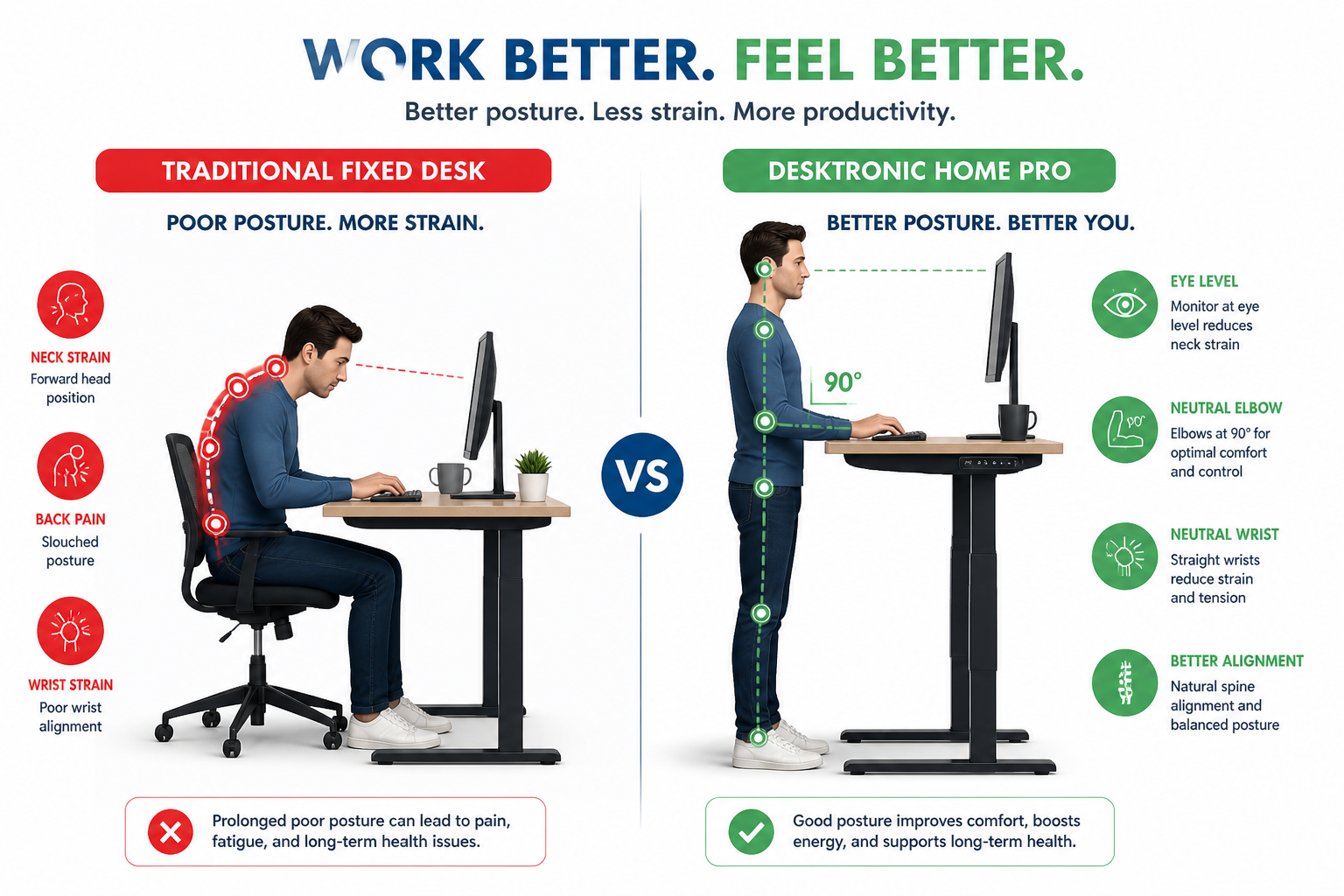
The core ergonomic benefit of the Desktronic Home Pro is its ability to match your desk height precisely to your body, whether you’re sitting or standing, and to switch between those positions quickly enough that you’ll actually do it.
Research from the British Journal of Sports Medicine has found that prolonged sitting is associated with increased risk of cardiovascular disease and musculoskeletal discomfort.
A height-adjustable desk doesn’t solve every problem, but it removes the physical barrier to alternating postures throughout the day.
Here’s what proper ergonomic setup looks like with the Desktronic Home Pro:
- Sitting position: Elbows at roughly 90 degrees, wrists neutral, monitor top at or just below eye level
- Standing position: Same elbow and wrist alignment, but hips and knees fully extended
- Transition frequency: Ergonomics researchers generally suggest alternating every 30–60 minutes, though the right interval varies by person
The desk’s 3-stage column design and 67 cm of total travel range (61–128 cm) means it accommodates users from around 5’0″ to 6’6″ in both sitting and standing positions a wider range than many competitors that top out at 120 cm.
For users who want to go further with their ergonomic setup, pairing the desk with a standing desk chair for better comfort can reduce fatigue during extended standing periods.
How Does the Dual Motor System Improve Stability?
A single-motor standing desk frame is adequate for light loads, but it tends to wobble at standing height, especially with heavier setups.
The Desktronic Home Pro uses a dual motor system that drives both legs simultaneously, which distributes the load evenly and eliminates the lateral sway that’s common in single-motor designs.
At 50 mm/s lifting speed, the desk moves from sitting to standing height in roughly 15 seconds, fast enough to be convenient, slow enough to feel controlled.
The anti-collision system adds another layer of reliability. If the desk encounters resistance during movement (a drawer left open, a cable snagged), it stops and reverses automatically rather than forcing through the obstruction.
Key stability features:
- Dual synchronized motors for even lift across both legs
- Soft start/stop to prevent jerking at the beginning and end of travel
- Height limit settings to prevent accidental over-extension
- 160 kg capacity handles dual monitors, docking stations, and accessories without strain
Common mistake: Many buyers underestimate how much their desk setup actually weighs. Two 27-inch monitors, a laptop, a docking station, speakers, and accessories can easily reach 30–40 kg. The Desktronic Home Pro’s 160 kg capacity gives substantial headroom.
Desktronic Home Pro Touchscreen Controller and Smart Features
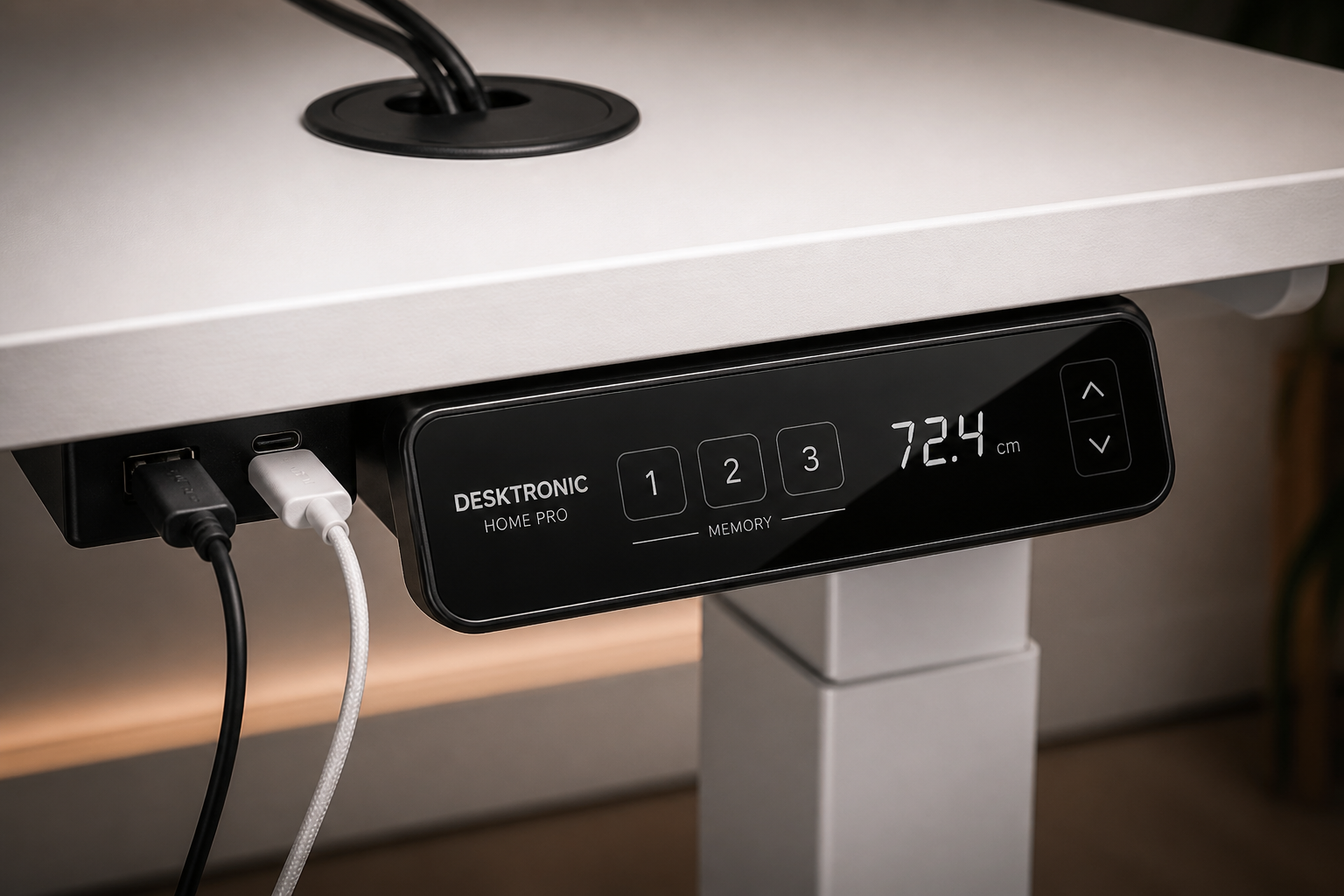
The touchscreen controller is one of the more practical differentiators on the Desktronic Home Pro. Three memory presets let you save your exact sitting height, standing height, and a third position (useful for a mid-height stool or a specific task).
Switching between presets is a single button press, which matters more than it sounds. Desks with manual height-setting (where you press and hold until you reach the right number) get used less because the friction is just high enough to discourage switching. One-touch presets remove that friction entirely.
Smart features summary:
- Touchscreen display showing current height in real time
- 3 programmable memory positions
- USB-A and USB-C charging ports built into the desk frame
- Cable grommets included for routing cables through the desktop surface
The built-in USB ports are a genuinely useful addition. Rather than running a separate USB hub or power strip to the desk surface, you can charge a phone, tablet, or peripheral directly from the desk. The USB-C port supports modern devices including laptops that charge via USB-C.
For a complete home office setup, consider pairing the desk with a wireless charging desk lamp to further reduce cable clutter on the surface.
How Do You Set Up and Assemble the Desktronic Home Pro?
Assembly is straightforward for most users. The package includes a pre-drilled office-grade tabletop, the dual-motor frame, cable grommets, and all necessary assembly tools.
Assembly steps:
- Unbox and identify all components, frame legs, crossbar, tabletop, controller, and hardware
- Attach the crossbar to both leg columns using the included hardware
- Mount the frame to the underside of the pre-drilled tabletop
- Connect the motor cables and controller wire to the central control box
- Install cable grommets in the pre-drilled holes for cable routing
- Power on and run the initialization sequence (lower the desk fully, then raise to calibrate)
- Set your three memory presets
Most users complete assembly in 45–60 minutes with one person, though having a second person helps when flipping the desk upright.
Edge case: If you purchase the frame-only version, you’ll need to drill your own tabletop. The pre-drilled tabletop included with the complete desk version simplifies this significantly.
For ideas on how to arrange your full workspace around the desk, the guide on stylish modern home office furniture offers practical layout suggestions.
How Does the Desktronic Home Pro Compare to Traditional Fixed Desks?
A fixed desk costs less upfront, typically $150–$350 for a quality option, but it locks you into a single working posture for the entire day.
The Desktronic Home Pro starts at $539, which represents a real cost difference, but the comparison changes when you factor in what you’re actually buying.
Fixed desk vs. Desktronic Home Pro:
| Factor | Fixed Desk | Desktronic Home Pro |
|---|---|---|
| Height adjustment | None | 61–128 cm electric |
| Posture flexibility | Sitting only | Sit and stand |
| Charging ports | Not included | USB-A + USB-C |
| Cable management | DIY | Grommets included |
| Noise during adjustment | N/A | Below 39 dB |
| Upfront cost | $150–$350 | From $539 |
| Long-term health impact | Higher sedentary risk | Reduced sedentary time |
The cost-benefit case for a sit-stand desk like the Desktronic Home Pro is strongest for people who work from home full-time. If you’re at your desk 8 hours a day, 5 days a week, the per-use cost of the desk drops quickly over a 3–5 year lifespan.
Pairing the desk with a quality ergonomic chair completes the setup. Our guide to choosing an ergonomic office chair for better posture covers what to look for.
What Do Users Say About the Desktronic Home Pro?
User feedback on the Desktronic Home Pro consistently highlights three things: the stability at standing height, the near-silent motor operation, and the quality of the tabletop surface.
Several users specifically mention that the desk doesn’t wobble when typing at standing height, a common complaint with cheaper alternatives. The sub-39 dB noise level, also gets noted by people who work in shared living spaces or take video calls frequently.
On the critical side, a small number of users mention that the assembly instructions could be clearer, particularly for the cable management routing. This is a minor friction point that doesn’t affect the desk’s performance once assembled.
“I’ve had the desk for eight months and use it daily. The stability at standing height is noticeably better than the budget desk I replaced. The USB-C port alone saves me from running an extra cable to the surface.” verified customer review
The 20,000-cycle motor rating, means the desk should handle multiple daily transitions for well over a decade before the motors show wear, a meaningful durability signal for a product at this price point.
What Is the Ideal Desk Height for Optimal Ergonomics?
The ideal desk height depends on your body measurements, not a universal number. For most adults, the correct sitting desk height places your elbows at 90 degrees with your forearms parallel to the floor. For standing, the same rule applies.
Quick calculation guide:
- Sitting height: Measure from the floor to the bottom of your elbow while seated upright. That number (in cm) is your target desk height.
- Standing height: Stand upright, relax your shoulders, and bend your elbows to 90 degrees. Measure from the floor to the bottom of your elbow. That’s your standing desk height.
For reference:
- A person 5’6″ (168 cm) tall typically needs a sitting height of ~68–72 cm and a standing height of ~100–108 cm
- A person 6’0″ (183 cm) tall typically needs ~72–76 cm sitting and ~108–116 cm standing
The Desktronic Home Pro’s range of 61–128 cm covers both ends of this spectrum comfortably, which is why the three memory presets are so practical — you set them once and never recalculate.
For more on maintaining good posture throughout the workday, see this guide on desk exercises for office workers that complement a sit-stand setup.
Health and Productivity Impact: What the Research Shows
Standing desks don’t make you healthier by themselves, the benefit comes from reducing the total time you spend sitting without moving.
The distinction matters because some users buy a standing desk and then stand all day, which creates its own set of problems (foot fatigue, varicose vein risk, lower back strain from static standing).
The evidence-based approach is to alternate. A 2018 study published in the British Medical Journal found that a workplace intervention including sit-stand desks reduced sitting time by over 80 minutes per day at one year of follow-up, with participants also reporting improvements in work engagement and job performance.
Practical productivity benefits of dynamic desk use:
- Reduced afternoon energy slumps — standing briefly after lunch can counteract the post-meal dip
- Improved focus during repetitive tasks — position changes provide a mild cognitive reset
- Reduced musculoskeletal discomfort — particularly lower back and neck tension from sustained sitting
- Better mood and energy — movement throughout the day is associated with reduced fatigue
The Desktronic Home Pro one-touch memory presets lower the behavioral barrier to actually switching positions, which is where many standing desk owners fall short, they own the desk but rarely use the standing function because it’s inconvenient.
For additional movement strategies during the workday, our effective standing desk workout ideas provide simple routines that complement a sit-stand desk routine.
Desktronic Home Pro Pricing and Where to Buy
The Desktronic Home Pro is available in two configurations: a complete desk (frame plus pre-drilled tabletop) and a frame-only version for buyers who have their own tabletop.
Pricing summary:
- US: From $539 for the complete desk
- UK: From £329 (regularly £499) for the complete desk
- Size range: 48×24 inches to 80×30 inches
- Color options: Black, White, Grey
The UK pricing currently reflects a sale from the regular £499 price point, which represents meaningful savings on a desk at this quality level.
👉 Check current pricing and availability on Amazon
For buyers in the US, the Amazon listing provides the most straightforward purchasing path with standard delivery and return options.
Frequently Asked Questions About the Desktronic Home Pro
Q: What is the height range of the Desktronic Home Pro?
The desk adjusts from 61 cm to 125.5 cm (up to 128 cm with a 2.5 cm tabletop), covering sitting and standing positions for users from approximately 5’0″ to 6’6″.
Q: How much weight can the Desktronic Home Pro hold?
The dual-motor frame supports up to 160 kg (352 lbs), which is sufficient for heavy dual-monitor setups, docking stations, and accessories.
Q: How loud is the Desktronic Home Pro when adjusting height?
Noise levels are below 39 dB during operation — roughly equivalent to a quiet library. This makes it suitable for video calls and shared living spaces.
Q: Does the Desktronic Home Pro come with a tabletop?
Yes, the complete desk version includes a pre-drilled office-grade tabletop with cable grommets. A frame-only version is also available for buyers with their own surface.
Q: How many memory presets does the Desktronic Home Pro have?
Three memory presets are programmable via the touchscreen controller, allowing instant one-touch switching between saved heights.
Q: Does the Desktronic Home Pro have USB charging ports?
Yes — it includes both USB-A and USB-C ports built into the desk frame for charging devices without a separate hub.
Desktronic Home Pro: FAQs
Q: How long does assembly take?
Most users complete assembly in 45–60 minutes. Having a second person available helps when flipping the assembled frame and tabletop upright.
Q: How durable are the motors?
The motors are rated for at least 20,000 cycles of intensive use. At 10 transitions per day, that’s over five years of daily use before reaching the rated cycle count.
Q: Is the Desktronic Home Pro available in different colors?
Yes — Black (RAL9005), White (RAL9016), and Grey (RAL9006).
Q: What sizes are available?
Desk sizes range from 48×24 inches to 80×30 inches, covering most home office footprints.
Q: Where is the Desktronic Home Pro made?
It is manufactured in Europe, which the brand uses as a quality differentiator compared to desks assembled from generic imported components.
Q: Is the anti-collision feature reliable?
Yes — the soft start/stop function and anti-collision sensitivity stop and reverse the desk if it encounters resistance during movement, protecting both the desk and any objects in its path.
Conclusion: Is the Desktronic Home Pro Worth It in 2026?
The Desktronic Home Pro earns its price point through a combination of features that matter in daily use: a dual motor that’s genuinely quiet and stable, a height range that works for most body types, integrated USB charging that reduces desk clutter, and three memory presets that make position switching effortless.
At $539 (US) or £329 (UK, currently on sale), it sits in the mid-premium tier of the standing desk market — above budget options that compromise on stability, and below high-end brands that charge for brand recognition more than performance.
Actionable next steps:
- Measure your ergonomic heights before ordering, use the elbow-angle method described above to confirm the desk’s 61–128 cm range fits your body
- Choose your size — the 60×24 inch option suits most solo home office setups; go to 72×30 or larger if you run multiple monitors
- Pick your color to match your existing workspace, Black, White, or Grey
- Order via Amazon for straightforward delivery and returns
👉 View the Desktronic Home Pro on Amazon
If you’re building out the rest of your home office setup, our guide to adjustable height office desks covers how to choose complementary furniture, and our ergonomic office chair recommendations will help you complete the setup properly.
References
[1] Homepro Standing Desk – https://desktronic.com/products/homepro-standing-desk
[2] Height Adjustable Desk Frame Homepro – https://desktronic.co.uk/products/height-adjustable-desk-frame-homepro
[3] Height Adjustable Desk Homepro – https://desktronic.co.uk/products/height-adjustable-desk-homepro
[4] Standing Desks – https://desktronic.com/collections/standing-desks
👉 Check current pricing and availability on Amazon